
MonoSpecs Repository Guide
Overview
MonoSpecs is the multi-repository management approach provided by HagiCode. It tracks and manages multiple sub-repositories through .hagicode/monospecs.yaml. Any project that needs to manage several independent repositories in one place can use it.
Migration notice:
monospecs.yamlhas moved from the project root to.hagicode/monospecs.yaml. Amonospecs.yamlin the root directory is no longer detected and there is no compatibility fallback. Existing projects need to create the.hagicode/directory and move the file manually.
💡 Quick start: See the monospecs-demo repository for a complete MonoSpecs project structure, including the configuration file, pull scripts, and README documentation.
Core concepts
Configuration file
.hagicode/monospecs.yaml is the core of the whole management approach. The file defines:
- The list and locations of the sub-repositories
- The Git URL of each repository
- Display names and icons
- How it integrates with OpenSpec
How OpenSpec usage differs from a regular repository
Both MonoSpecs-managed projects and regular single repositories can use HagiCode’s OpenSpec workflow for change management. The differences are:
| Feature | Regular repository | MonoSpecs-managed project |
|---|---|---|
| OpenSpec location | openspec/ in the repository root | openspec/ in the main repository root |
| Change scope | Limited to the current repository | Can involve multiple sub-repositories |
| Sub-repository cleanliness | Specs are mixed with code | Specs live in the main repository, so sub-repositories stay cleaner |
| Automatic commit on archive | Specs changes must be committed manually | commit_when_archive automatically commits specs to the main repository |
In short, the MonoSpecs approach separates specs from sub-repository code to keep the sub-repositories clean, and it simplifies specs management through automatic commits.
Why use MonoSpecs
- Unified management: Track all sub-repositories in one configuration file
- Automation support: Provide repository metadata for scripts and tools
- AI-friendly: Structured configuration helps AI Agents understand how the repositories relate
- OpenSpec integration: Integrates seamlessly with the change management workflow
When to use MonoSpecs
Consider MonoSpecs first in these scenarios:
1. Multi-repository collaborative development
When a project is split into several independent repositories and needs unified management:
- The frontend app, backend service, and desktop app are developed separately
- Supporting projects such as documentation, the official website, and build tools
- The repositories depend on each other, so versions and changes need to be coordinated
2. Cross-repository feature development
When you use OpenSpec for change management:
- One feature change may involve multiple repositories
- You need to track which repositories a change is implemented in
- Changes are committed automatically to the correct target repository
3. AI-assisted development
Give AI Agents information about the project structure:
- Describe each repository’s tech stack and conventions in
AGENTS.md - AI can understand how the repositories relate based on the configuration
- Supports cross-repository code generation and refactoring
4. Continuous integration and deployment
CI/CD pipelines need to:
- Process multiple repositories in batches
- Build and deploy automatically based on the configuration
- Track the versions and dependencies of each repository
How MonoSpecs differs from regular repositories
| Feature | Regular multi-repository project | MonoSpecs-managed project |
|---|---|---|
| Repository discovery | Look up and record repositories by hand | Read automatically from .hagicode/monospecs.yaml |
| Batch operations | Scripts must be written by hand | Unified, configuration-driven scripts |
| AI support | Relies on written documentation | Structured configuration plus AGENTS.md |
| Repository metadata | Scattered in different places | Managed centrally (icon, name, URL) |
| Onboarding | Requires reading several documents | Run a single script |
Project structure
A MonoSpecs setup needs a main repository to manage the configuration. The main repository is itself a Git repository, and it is used to:
- Store the
.hagicode/monospecs.yamlconfiguration file - Manage cross-repository configuration and scripts
- Track the metadata relationships between sub-repositories
Taking the HagiCode Mono project as an example, a typical MonoSpecs project looks like this:
Directoryyour-project/ # Main repository (Git repository)
Directory.git/ # Git history of the main repository
- …
- .gitignore # Excludes the repos/ directory
Directory.hagicode/ # HagiCode project data directory
- monospecs.yaml # Repository configuration file
Directoryopenspec/ # OpenSpec change directory (optional)
- …
Directoryrepos/ # Sub-repository directory (not in Git)
Directoryfrontend/ # Sub-repository (independent Git repository)
- …
Directorybackend/ # Sub-repository (independent Git repository)
- …
- … # Other sub-repositories
All sub-repositories should live under the repos/ directory, and that directory must be excluded from the main repository’s Git version control. You can do this by adding the following to the main repository’s .gitignore file:
# 排除所有子仓库repos/This prevents the main repository from tracking the contents of the sub-repositories, so each sub-repository manages its own version control independently.
Quick start
This section walks you through the initial MonoSpecs setup so you can start using multi-repository management right away.
Initialization
Follow these steps to complete the MonoSpecs initialization:
1. Create an empty repos folder
Create an empty repos folder in your main repository. It holds all of the sub-repositories and is the folder you exclude in step 3 (the .gitignore entry):
mkdir reposcd reposgit initcd ..2. Configure the monospecs file
Create the .hagicode/monospecs.yaml configuration file in the root of the main repository and add the sub-repositories you want to manage:
mkdir -p .hagicodeversion: "1.0"commit_when_archive: true
repositories: - path: "repos/frontend" url: "https://github.com/your-org/frontend.git" displayName: "前端应用" icon: "🌐" - path: "repos/backend" url: "https://github.com/your-org/backend.git" displayName: "后端服务" icon: "⚙️"3. Add the .gitignore entry
Add the following to the .gitignore file of the main repository to exclude the sub-repository directory:
# 排除所有子仓库repos/4. Pull all sub-repositories (repo)
Use the clone script to pull the configured sub-repositories.
This clones all sub-repositories into the repos/ directory according to the configuration in .hagicode/monospecs.yaml.
5. Add the parent repository to HagiCode
If you use the HagiCode desktop app, open it and add the main repository as a project through the interface. Click the “Add project” or ”+” button and select your main repository folder.
If everything is configured correctly, you will see the list of all sub-repositories and their status.
.hagicode/monospecs.yaml configuration
Configuration file location
The configuration file lives in the project root:
Directoryyour-project/
Directory.hagicode/
- monospecs.yaml
Configuration options
# 版本号version: "1.0"
# 归档时自动提交(OpenSpec 使用)commit_when_archive: true
# 仓库列表repositories: # 仓库路径(相对于项目根目录) - path: "repos/frontend" # Git 仓库 URL url: "https://github.com/your-org/frontend.git" # 显示名称 displayName: "前端应用" # 图标(emoji) icon: "🌐"| Option | Type | Required | Description |
|---|---|---|---|
version | string | Yes | Configuration file version |
commit_when_archive | boolean | No | Whether to automatically commit specs to the main repository on archive (sub-repository code is not committed) |
repositories | array | Yes | List of repository configurations |
repositories[].path | string | Yes | Relative path of the repository |
repositories[].url | string | Yes | Git repository URL |
repositories[].displayName | string | Yes | Repository display name |
repositories[].icon | string | No | Repository icon (emoji) |
Repository management operations
Add a new repository
Add a new entry to the repositories array in .hagicode/monospecs.yaml:
repositories: # ... 现有仓库 - path: "repos/new-service" url: "https://github.com/HagiCode-org/new-service.git" displayName: "新服务" icon: "🆕"Update repository configuration
When a repository URL or its metadata changes:
- Edit
.hagicode/monospecs.yamland update the corresponding entry - Verify that the YAML syntax is correct
- If you need to sync the change, update the local repository configuration manually
Core features
This section introduces the core visual features available once MonoSpecs is integrated with OpenSpec, so you can understand and use them more intuitively.
Note: The screenshots below show the result with MonoSpecs enabled.
Sub-repository selection
When you create a new proposal, you can choose the target sub-repositories to reference and edit. The system automatically detects the available sub-repositories and lists them.
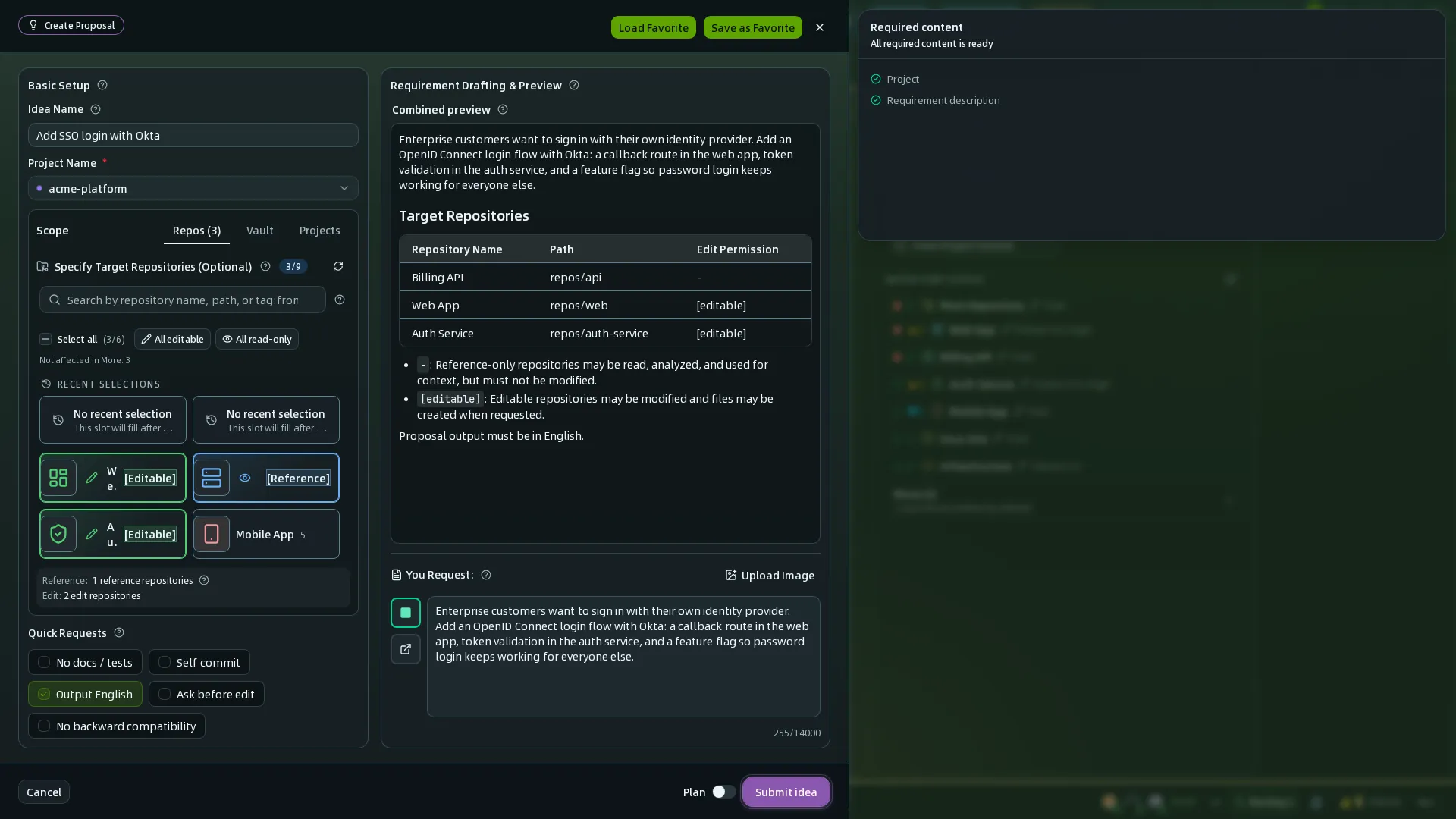
When a change is created, OpenSpec reads the .hagicode/monospecs.yaml configuration and lists all available sub-repositories for you to choose from. Pick the sub-repositories you need to modify, and the system automatically tracks the scope the change covers.
Repository detail preview
When you hover over a repository in the project panel, a popup shows the repository’s details and quick actions.
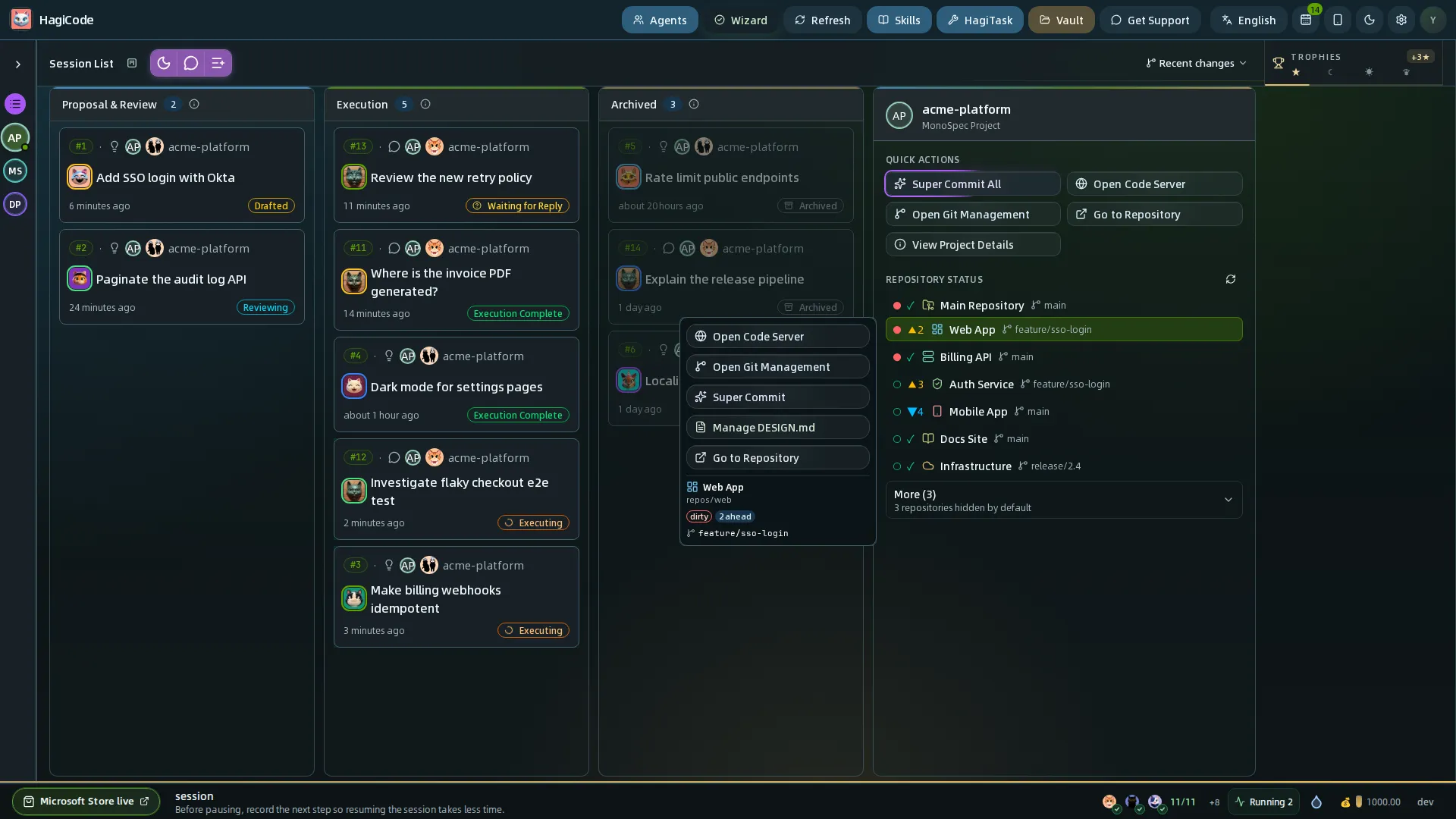
With this interactive preview you can quickly see:
- The repository name, path, and current branch
- The repository’s current status (whether there are uncommitted changes, and how many commits it is ahead of or behind the remote)
- Quick actions for the repository: open Code Server, open Git management, Super Commit, manage DESIGN.md, and go to the repository
Super Commit sub-repository selection
When you commit changes with Super Commit, you can choose specific sub-repositories as the target.
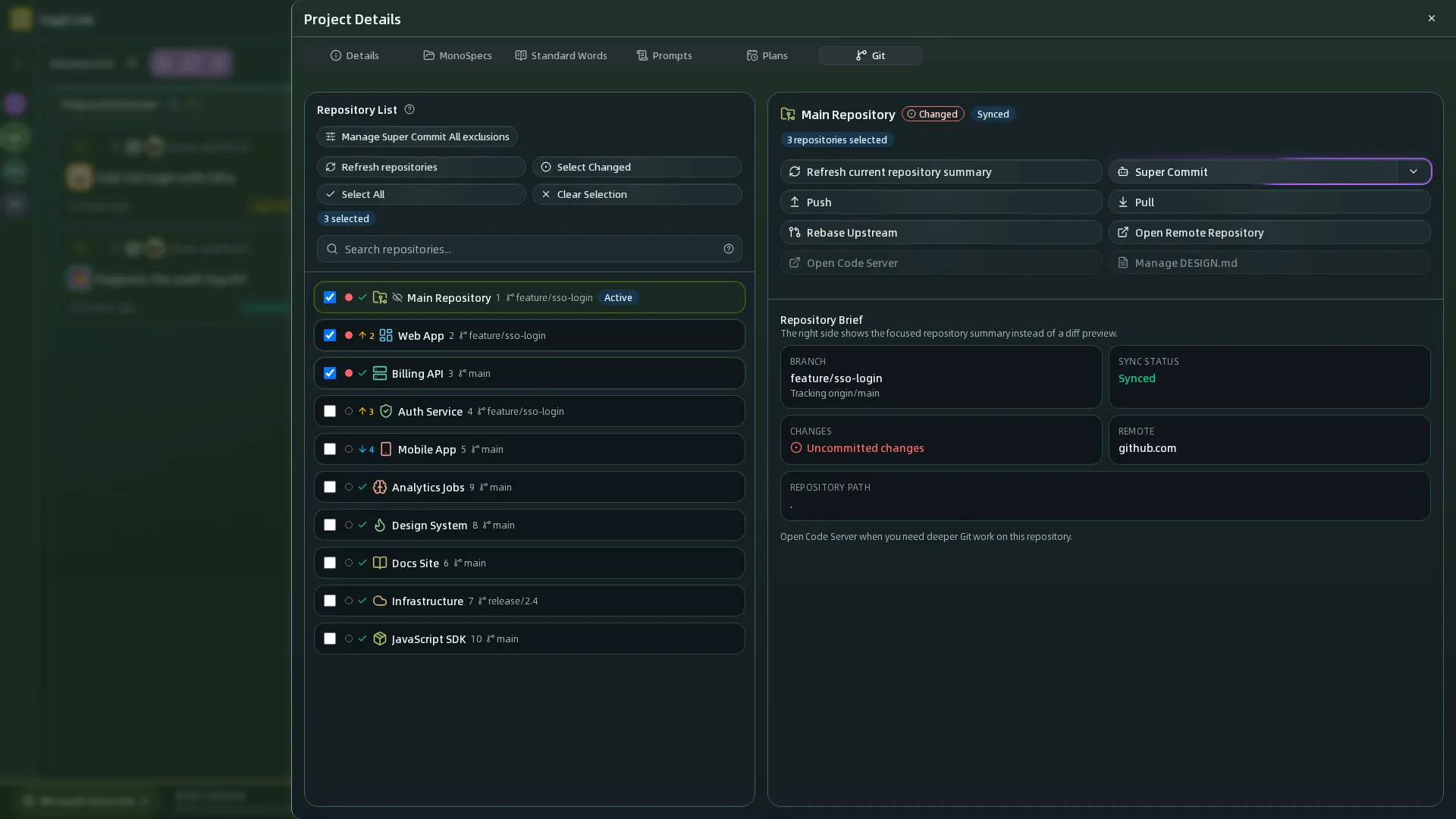
Super Commit will:
- Read the
.hagicode/monospecs.yamlconfiguration - Analyze your changes
- Suggest which sub-repositories you should commit to
- Let you accept the suggestions or specify the target repositories manually
Integration with OpenSpec
Both MonoSpecs-managed projects and regular repositories can use HagiCode’s OpenSpec workflow. The main differences are where the OpenSpec folder lives and how changes are distributed.
OpenSpec folder location
Regular repository:
my-repo/ - openspec/ # OpenSpec 变更目录(与代码混在一起) - src/MonoSpecs-managed project:
your-project/ # 主仓库 - openspec/ # OpenSpec 变更目录(独立管理) - .hagicode/ - monospecs.yaml - repos/ - frontend/ # 子仓库(更干净,无 openspec/) - backend/ # 子仓库(更干净,无 openspec/)Advantage: Keeping specs in the main repository leaves the sub-repositories clean, containing only real code with no specification documents mixed in.
How changes are distributed
Regular repository:
- Changes only affect the current repository
- Specs and code are in the same repository
- Specs-related changes must be committed manually after archiving
MonoSpecs-managed project:
- OpenSpec reads
.hagicode/monospecs.yamlto identify the repository scope - The target repository is matched automatically from the paths of the changed files
- With
commit_when_archive: true, archiving commits specs to the main repository automatically, with no manual steps - Actual code changes in sub-repositories must be committed manually
About commit_when_archive
When commit_when_archive: true is set:
version: "1.0"commit_when_archive: true # 归档时自动提交 specs 到主仓库Behavior on archive:
- OpenSpec automatically commits the specs changes (proposal, design, tasks, and so on) to the main repository
- The actual code changes in the sub-repositories are not committed (code must be committed manually)
- You no longer have to manage the version control of specs by hand
Example flow:
- Create the change
openspec/changes/add-user-auth/ - Finish the design and tasks, and implement the code
- Run the archive operation
- OpenSpec automatically commits the specs to the main repository
- Manually commit the code changes in the sub-repositories
Example
Create a change in a MonoSpecs-managed project:
openspec/changes/add-user-auth/ - proposal.md - design.md - tasks.mdWhen this change involves modifying repos/frontend/src/components/Login.tsx:
- OpenSpec reads
.hagicode/monospecs.yaml - It identifies the repository configuration that corresponds to
repos/frontend - The developer implements the code changes
- On archive, OpenSpec automatically commits the specs to the main repository
- The developer manually commits the code changes in the frontend sub-repository
AI Agent configuration support
Projects that use MonoSpecs can give AI Agents project-specific guidance through AGENTS.md:
Directoryyour-project/
- AGENTS.md # Agent configuration at the main repository level
Directoryrepos/
Directoryfrontend/
- AGENTS.md # Repository-specific Agent configuration (inherits the main configuration)
Directorybackend/
- AGENTS.md # Agent configuration for the backend repository
Each repository’s AGENTS.md can include:
- Tech stack notes: frameworks, build tools, state management, and so on
- Code conventions: naming conventions, file structure, best practices
- Project-specific behavior: extensions of, or differences from, the main repository configuration
- OpenSpec integration: how to take part in the change management workflow
This layered configuration lets AI Agents:
- Understand the global conventions of the main repository
- Recognize the special requirements of each repository
- Stay consistent when operating across repositories
Best practices
Naming conventions
- Repository path: Use the
repos/prefix to stay consistent - Repository name: Use kebab-case (lowercase letters and hyphens)
- Display name: Use concise Chinese names
- Icon choice: Use an emoji related to the repository’s function
Configuration maintenance
- Keep the configuration in sync with the actual repository state: Regularly make sure
.hagicode/monospecs.yamlreflects the real repository structure
Migrating from the root monospecs.yaml
If your project still uses a monospecs.yaml in the root directory, migrate it manually to the new HagiCode project data directory:
mkdir -p .hagicodemv monospecs.yaml .hagicode/monospecs.yamlgit add .hagicode/monospecs.yamlgit rm monospecs.yamlgit commit -m "Move MonoSpecs config to .hagicode"After migration, HagiCode only reads .hagicode/monospecs.yaml. If only the root monospecs.yaml is kept, the project is treated as having no MonoSpecs configured, and the related scripts will not read it as a compatibility path.
2. Version control: Commit every configuration change to version control
3. Documentation updates: Update the related documentation when you add or remove a repository
Verification
- Confirm that repository paths contain no special characters
- Verify that the YAML syntax is correct
HagiCode
HagiCode is an agentic coding workspace. Rich, convenient UI interactions make planning, agent execution, and project work approachable and easy to navigate, creating an engaging development experience.
Explore an engaging development experience through rich, convenient UI interactions.

- SmartOpenSpec workflows turn intent into an executable path, from proposal to design, tasks, and a shipped change.
- EfficientMulti-agent execution keeps research, implementation, and review moving in parallel, across several repositories and the Agent CLIs you already use.
- InterestingRich, convenient UI interactions make planning, agent execution, and project work approachable and easy to navigate.
Download for Windows
Share HagiCode

Turn ideas into shipped software.
HagiCode is an agentic coding workspace. OpenSpec workflows plan the change, multi-agent execution carries it out, and Hero Scenario makes the long run visible, so ideas become shipped software.
- Smart
- OpenSpec workflows turn intent into a path from proposal to shipped change.
- Efficient
- Multi-agent execution runs research, build, and review in parallel.
- Fun
- Rich UI interactions make planning, agent work, and projects easier to follow.
© 2026 HagiCode | Powered By hagilight-starlight@0.21.0 | Branch: main | Commit: 951128b | Built: