Zum Inhalt springen

Sprache wählen

Aktuelle Sprache: Deutsch

Junie CLI vs HagiCode: Features and Comparison

Junie CLI is JetBrains' terminal coding agent, and HagiCode is a desktop and web workbench that runs Junie as its executor. Stay with Junie alone for terminal, IDE and CI work; add HagiCode when you want parallel sessions, spec proposals and managed commits around it.

Short answer

Junie CLI is JetBrains' agentic coding tool: you run junie in a project directory and give it tasks in a terminal UI. HagiCode is a desktop and web AI programming workbench that drives agent CLIs, Junie among them, as its executor. It does not replace Junie. Junie still does the coding, and HagiCode adds sessions, proposals and commit handling around it.

If you work in a terminal, a JetBrains IDE or CI pipelines and one task at a time is enough, Junie alone is the simpler choice. If you juggle several tasks or repositories and want each change tied to a written proposal, HagiCode is worth adding on top. HagiCode does not sell models; Junie keeps its own sign-in and billing.

Junie CLI vs HagiCode at a glance

DimensionJunie CLIHagiCode
What it isJetBrains' LLM-agnostic coding agent for the terminal, IDE and CIWorkbench that runs agent CLIs, Junie included, as executors
Interface and platformsTerminal UI on Linux, macOS and Windows; IDE plugin; GitHub Actions and GitLab CIDesktop app (Windows, macOS, Linux), Docker Compose container, Microsoft Store edition
Pricing and licensingBilled through a JetBrains plan (free Junie Lite model, AI Pro, AI Ultimate credits), a Junie API key or your own keys; see JetBrains' pricing pageDesktop and Container free; Store edition free with optional one-time TurboEngine purchase; model cost stays with Junie
Model and provider accessDefault model, or BYOK: OpenAI, Anthropic, Google, xAI, OpenRouter, GitHub Copilot, custom endpoints (LiteLLM, Ollama, LM Studio)Hosts no models; uses whatever Junie is signed in to; optional OmniRoute routing
Parallel workOne session per terminal or CI job; you coordinate parallel runs yourselfSeveral sessions at once, each a named Agent with visible status
Spec and planning workflowPlan mode writes a design document from read-only analysisOpenSpec proposals: propose, validate, apply, archive (3 concurrent free, 32 with TurboEngine)
Git and commit handling/review inspects changes in a Git repository; --review for CIAI-composed commit messages with the repository locked during the commit; Git and GitHub integration
Setup effortOne install command, then sign inDesktop install, plus Junie installed and signed in first
Best forDevelopers who want a JetBrains-backed agent in terminal, IDE or CIPeople running several agent tasks or repositories with traceable specs

What Junie CLI does well

One agent across terminal, IDE and CI

Junie runs interactively in the terminal, as an IDE plugin, and headless in GitHub Actions and GitLab CI. A CI step can be as short as junie --auth="$JUNIE_API_KEY" "Fix any failing tests", or --review for a code review. You learn one tool and use it in all three places.

Billing and model choice you control

Junie signs in three ways: a JetBrains account, a Junie API key with usage-based billing, or your own keys from providers such as OpenAI, Anthropic, Google, xAI, OpenRouter and GitHub Copilot. Custom endpoints such as LiteLLM, Ollama and LM Studio also work. JetBrains states that BYOK usage is billed at provider rates with no markup, and effort levels are available for models that support them.

Graduated approval controls

Brave mode has three levels: Off asks before sensitive actions, Auto approves commands classified as safe, On runs them without asking. Sandbox mode (Early Access) wraps terminal commands in an OS-level sandbox on macOS and Linux. Plan mode produces a design document from read-only analysis, and Debug mode works with a connected JetBrains IDE.

Update channels and status

You can run another channel for a single launch, for example junie --eap or junie --nightly, without changing your installed default. JetBrains announced Junie CLI as a beta in March 2026; current docs do not state a status, so check junie.jetbrains.com before relying on it for production CI.

When to choose Junie CLI, and when to choose HagiCode

Junie CLI passt, wenn

  • you work in a terminal or JetBrains IDE and one task at a time is enough;
  • you want the same agent in CI, using a Junie API key with --review or a headless task;
  • you prefer to manage provider keys, custom endpoints and effort directly in Junie;
  • you want Junie's own three-level Brave setting and sandbox mode instead of a wrapper's switch;
  • you want the fewest moving parts.

HagiCode passt, wenn

  • you run several Junie tasks across repositories at once and want each as a named, trackable Agent;
  • you want every change to start as a written OpenSpec proposal with validation and archive;
  • you want Junie's changes committed with composed messages and tweaked in an editor inside the same window;
  • you use more than one agent CLI and want a single workspace around them;
  • you want a shared knowledge base (Vault) and multi-repo specs (Monospecs) around your agent.

Using Junie CLI together with HagiCode

HagiCode is a workbench on top of the CLI. It starts junie in ACP mode inside the repository you open, so your own Junie install and sign-in do the work. HagiCode has no Junie credential fields and adds no model billing.

Nothing is locked in: Junie stays a normal install that you can still run in any terminal.

  1. Install Junie (macOS/Linux: curl -fsSL https://junie.jetbrains.com/install.sh | bash; Windows: the PowerShell installer on the Junie docs page), then run junie once and sign in.
  2. Install HagiCode Desktop (Windows, macOS or Linux; free).
  3. In the Agent CLI settings, choose Junie as the executor and optionally set provider, model, effort and Brave.
  4. Open a repository and start a session or an OpenSpec proposal.
  5. Expect Junie to run with Brave on unless you turn it off, and a changed provider or model to start a compatible new session rather than resume the old one.
  6. To go back to plain Junie, run junie in the same directory; your Junie install and sign-in are untouched.

What HagiCode adds on top of any agent

Parallel sessions and Agents management

Run several Junie sessions side by side, each with its own context, and see which Agent is running, waiting or finished. Without HagiCode that means several terminals you track yourself.

OpenSpec proposals

Each task can start as a proposal that Junie implements within agreed constraints. Plan mode gives you a design document inside one session; a proposal keeps the reasoning, discussion and code changes together and archivable across sessions.

AI commit and Code Server

HagiCode drafts the commit message from your diff and locks the repository while committing. The embedded Code Server lets you open the file Junie edited and adjust it without leaving the workbench.

Monospecs and Vault

Monospecs declares sub-repositories in .hagicode/monospecs.yaml so Junie sees the whole change surface. Vault registers reference projects and notes once and injects them into new proposals.

OmniRoute, tool-call view and usage

OmniRoute can route model traffic centrally when Junie is configured to use it. Junie's tool calls appear in the same typed view as every other agent, and the optional TokenMonitor integration shows today's tokens and cost in the status bar.

The bottom line

  • Junie CLI is a capable terminal, IDE and CI agent from JetBrains; for single tasks it needs nothing else.
  • HagiCode adds parallel Agents, OpenSpec proposals, AI commits and a shared knowledge base around Junie, at the cost of one more install and a 3-proposal cap on free editions.
  • Pick Junie alone for CI and terminal-first work, HagiCode plus Junie for multi-task, multi-repo work with traceable specs.

Häufige Fragen

Is Junie CLI free?
The Junie CLI itself runs on a JetBrains subscription plan (a free Junie Lite model is included with a JetBrains account), a usage-billed Junie API key, or your own provider keys billed at provider rates. See the pricing page at junie.jetbrains.com for current plans.
How do I install Junie CLI?
On macOS or Linux run curl -fsSL https://junie.jetbrains.com/install.sh | bash, then cd into your project and run junie. Windows uses a PowerShell installer listed on the Junie docs page; Homebrew and npm (@jetbrains/junie) are alternatives in the repository README.
Can I use Junie CLI with HagiCode?
Yes. Install and sign in to Junie first, then choose Junie as the Agent CLI in HagiCode. HagiCode runs it over ACP and never asks for Junie credentials.
Does HagiCode replace Junie CLI?
No. HagiCode is a workbench around the CLI; Junie still writes the code, and you can run it directly at any time.
Is Junie CLI still in beta?
JetBrains announced Junie CLI as a beta in March 2026. The current docs do not state a status, so check junie.jetbrains.com for the latest.
Junie CLI vs HagiCode: which should I pick?
Use Junie alone for CI, terminal and IDE work on one task at a time. Add HagiCode when you run several tasks or repositories and want proposals, commits and Agents managed in one place.

HagiCode

HagiCode ist ein agentischer Coding-Arbeitsplatz: OpenSpec-Workflows planen die Änderung, Multi-Agent-Ausführung setzt sie um, und Hero Dungeon macht den langen Weg sichtbar, bis aus der Idee ausgelieferte Software wird.

Mit einem intelligenteren, schnelleren und unterhaltsameren agentischen Workflow wird aus Ideen nutzbare Software.

HagiCode besuchenDokumentation lesen
  • IntelligentOpenSpec-Workflows machen aus einer Absicht einen umsetzbaren Weg vom Vorschlag über Design und Aufgaben bis zur Auslieferung.
  • EffizientMulti-Agent-Ausführung führt Recherche, Umsetzung und Prüfung parallel aus, über mehrere Repositories und die Agent CLIs, die Sie bereits nutzen.
  • UnterhaltsamHero Dungeon macht lange Coding-Sitzungen zu einem sichtbaren Abenteuer mit Helden, Fortschritt und Erfolgen.

HagiCode auf einen Blick

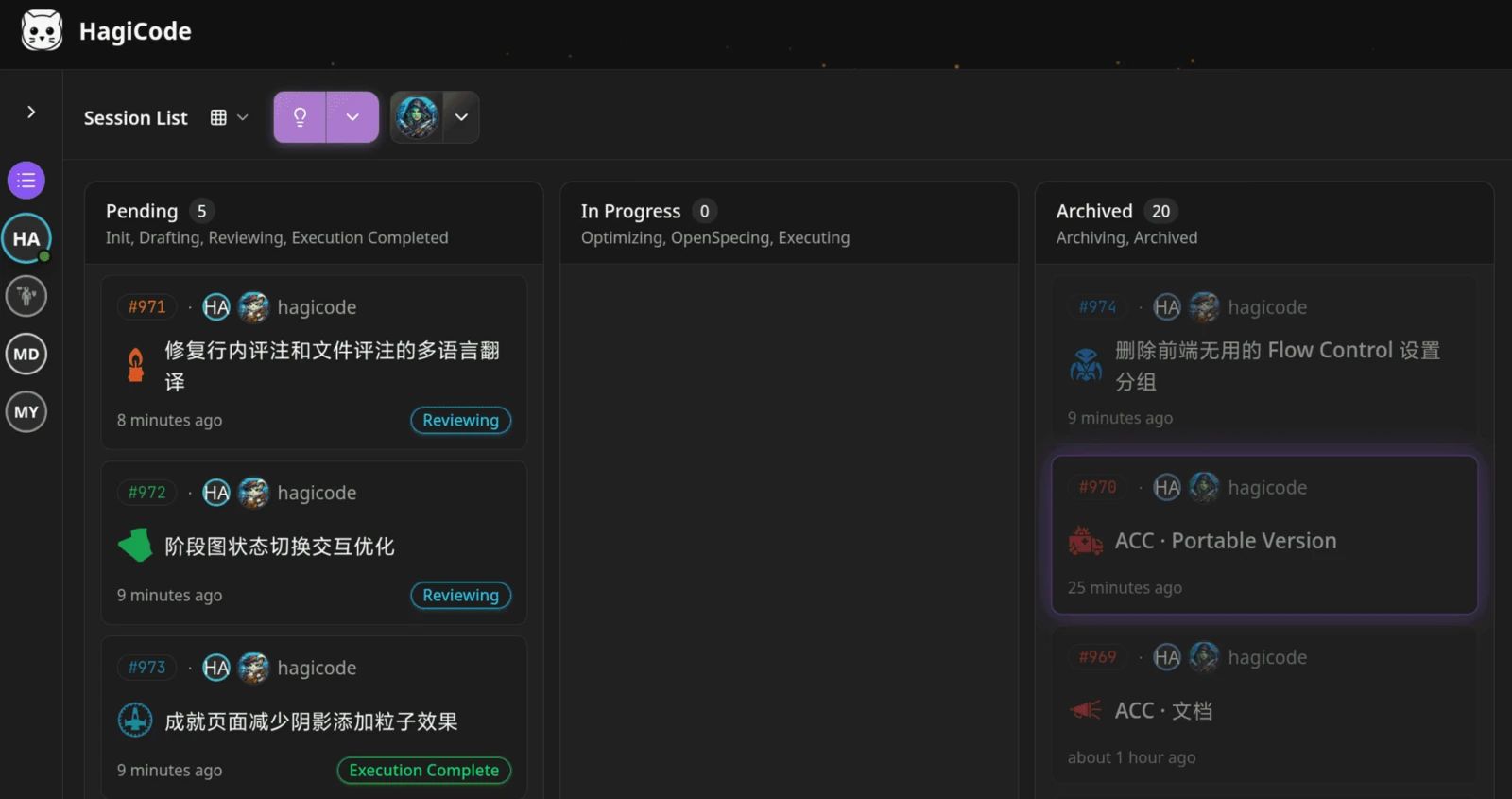
  • HagiCode-Werkbank mit einem Kanban-Board der Sitzungen in den Spalten Ausstehend, In Bearbeitung und Archiviert.
    Die Werkbank: alle Sitzungen auf einem Kanban-Board.
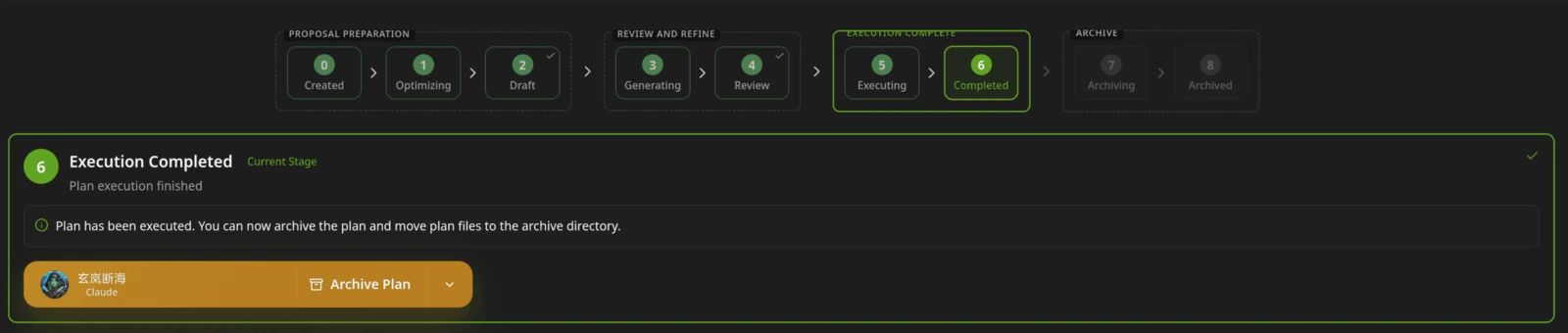
  • Stufenleiste eines HagiCode-Vorschlags von Erstellt bis Archiviert; die Stufe Ausführung abgeschlossen ist hervorgehoben, dazu die Schaltfläche Plan archivieren.
    Ein Vorschlag wandert von Erstellt über Entwurf und Prüfung bis zu Ausführung und Archiv.
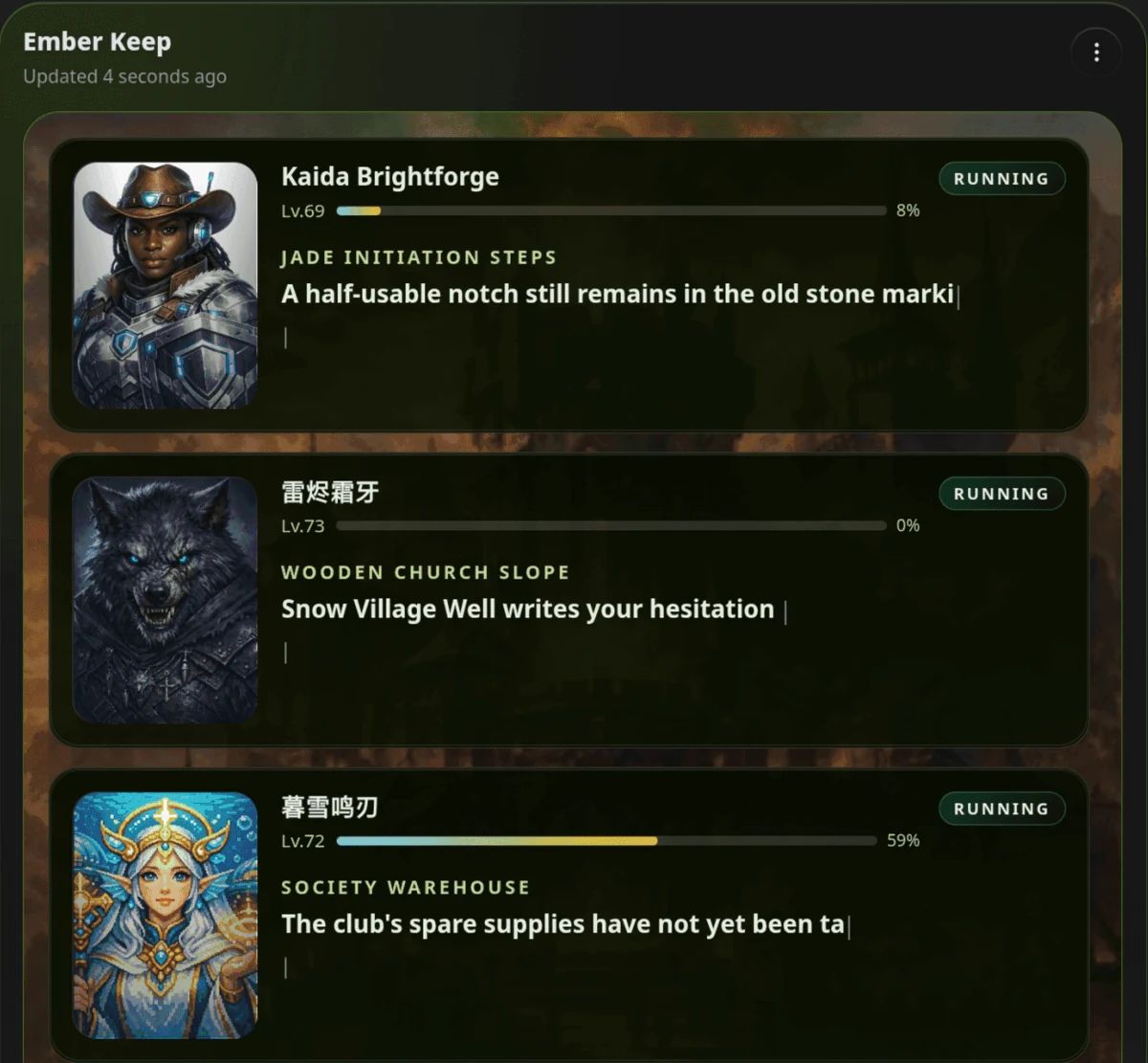
  • Bereich Hero Dungeon von HagiCode namens Ember Keep mit drei laufenden Helden samt Level, Fortschritt und Geschichtstext.
    Hero Dungeon: Helden erledigen die Arbeit, Sie behalten Fortschritt, Level und Geschichte im Blick.

Für Windows herunterladen

Im Microsoft Store erhaltenAlle Downloads

Aus Ideen wird ausgelieferte Software.

HagiCode ist ein agentischer Coding-Arbeitsplatz: OpenSpec-Workflows planen die Änderung, Multi-Agent-Ausführung setzt sie um, und Hero Dungeon macht den langen Weg sichtbar, bis aus der Idee ausgelieferte Software wird.

Intelligent
OpenSpec-Workflows machen aus einer Absicht einen Weg vom Vorschlag bis zur Auslieferung.
Effizient
Multi-Agent-Ausführung treibt Recherche, Umsetzung und Prüfung parallel voran.
Unterhaltsam
Hero Dungeon macht lange Sitzungen sichtbar: mit Helden, Fortschritt und Erfolgen.