
AI Compose 提交指南
编辑此页AI Compose Commit 讀取目前程式碼變更並產生傳統提交格式的提交訊息。重點很簡單:花更少的時間編寫提交,同時保持歷史記錄更清晰。
什麼是 AI Compose Commit?
Section titled “什麼是 AI Compose Commit?”AI Compose Commit 會分析您的變更並為其編寫標準化的提交訊息。它用手動提交寫入來換取更一致的歷史記錄。
在以下情況下使用它:
- 需要多次提交的大型程式碼更改
- 具有協調變更的多重儲存庫項目
- 需要標準化提交格式的團隊
- 想要提高提交品質的開發人員
| 特點 | 傳統手動提交 | AI 撰寫投稿 |
|---|---|---|
| 承諾品質 | 取決於個人經驗 | 基於最佳實踐,始終如一的質量 |
| 提交速度 | 需要思考和組織 | 一鍵即時生成 |
| 一致性 | 提交之間可能有所不同 | 自動遵循標準 |
| 多倉庫支援 | 需要手動協調 | 自動倉庫識別和分組 |
| 節省時間 | 可能需要大量時間 | 每次提交節省 10-60 秒以上 |
在 HagiCode 桌面應用程式中,導航至要使用 AI Compose Commit 的項目並啟用此功能。
重要:首先確保您的專案已新增至 HagiCode。
在Git操作部分找到「AI組合提交」按鈕。
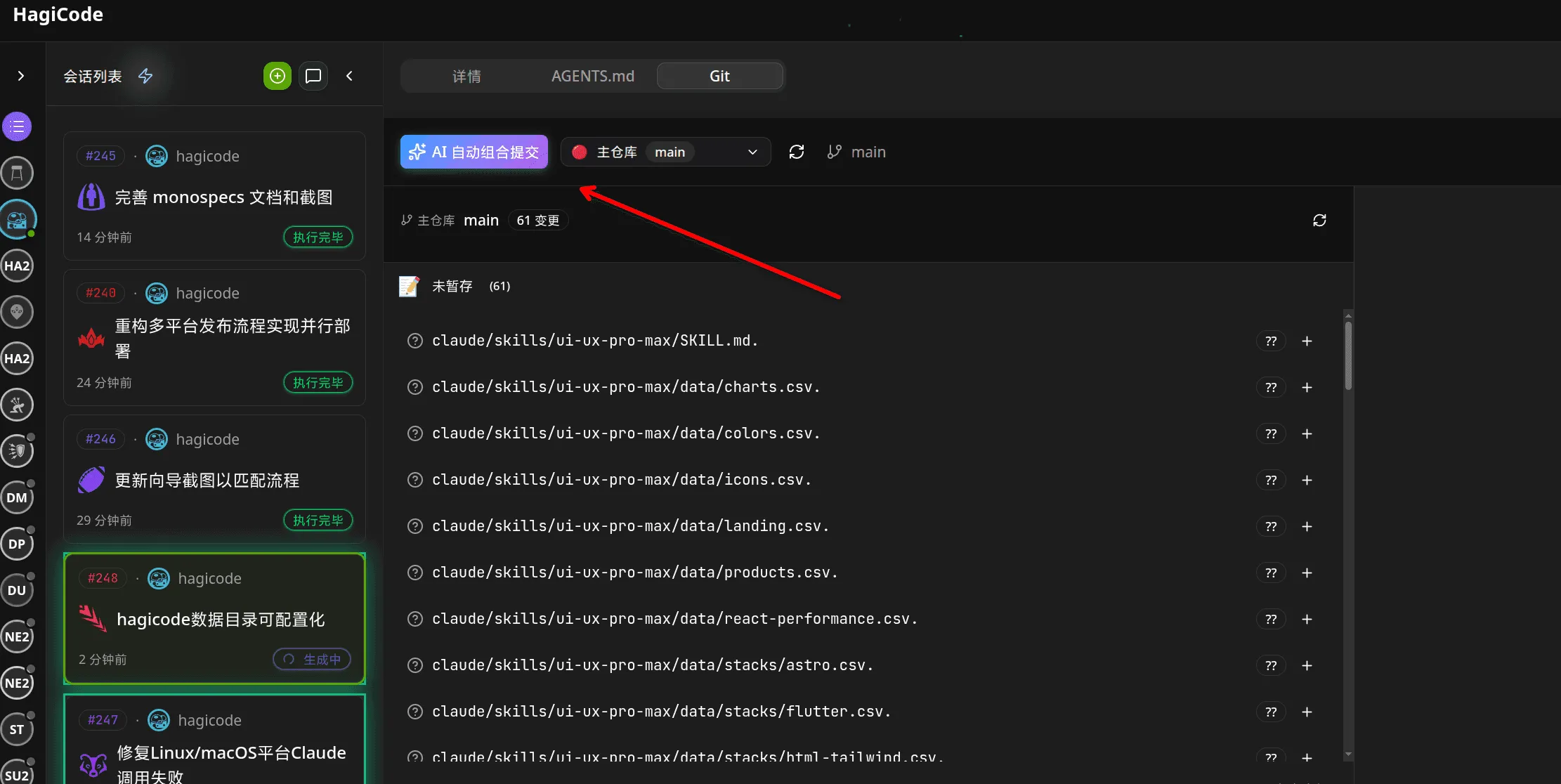
此按鈕通常位於 Git 操作部分的顯著位置,靠近其他版本控制操作。
重要提示:按一下此按鈕將觸發自動提交訊息產生。如果需要回滾或修改提交,請使用標準 Git 指令。
首次使用風險提示
Section titled “首次使用風險提示”首次使用 AI Compose Commit 或進行未經批准的更改時,系統將顯示確認對話方塊。
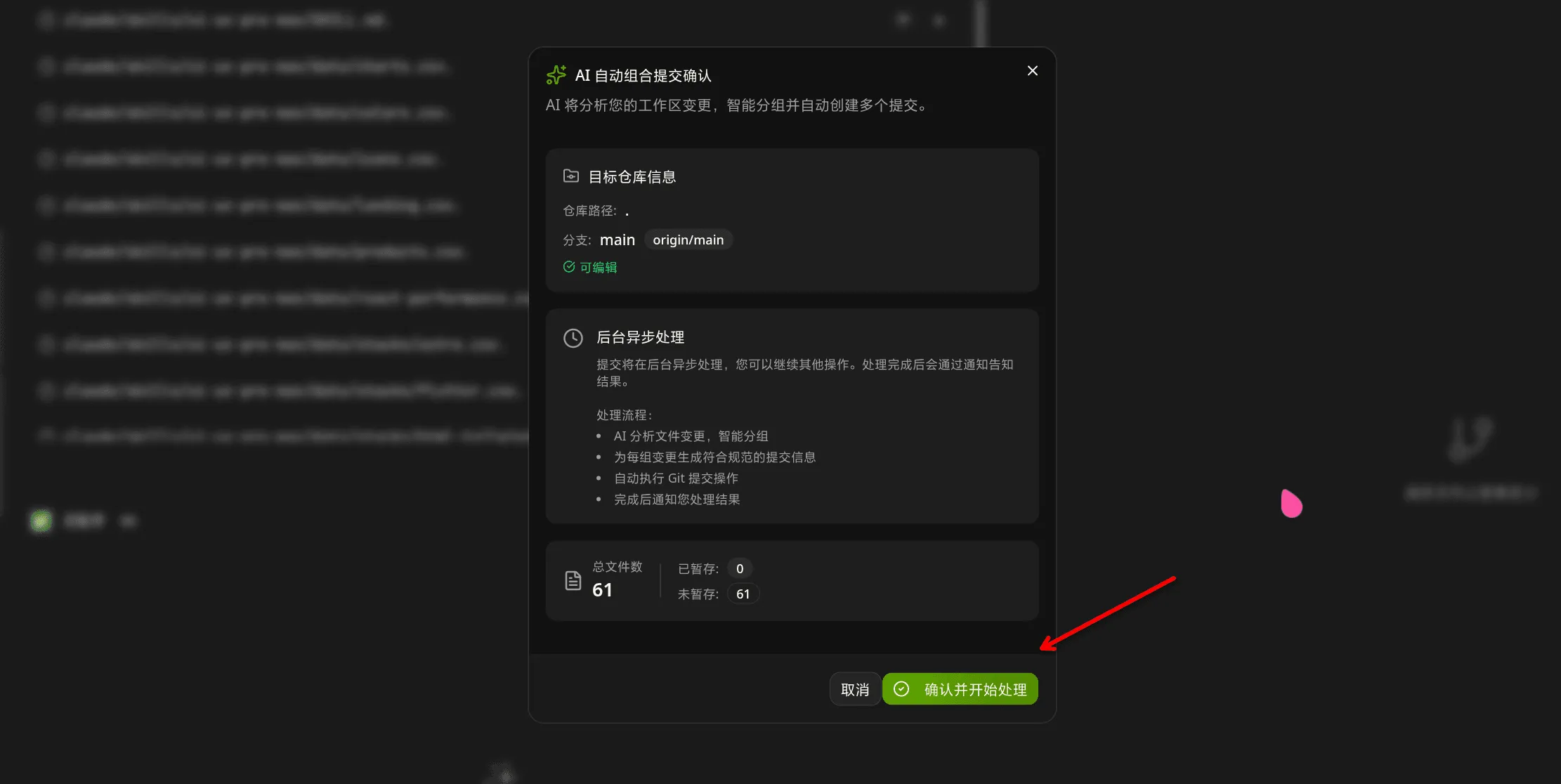
此對話方塊包含的選項包括:
- 確認並開始處理
- 了解風險,不再顯示此提示
- 勾選此選項,後續使用更加方便
建議首次使用時仔細閱讀風險提示,以了解自動提交的含義。
AI完成處理後,您將看到成功通知。
提交訊息已產生並準備就緒。如果需要,您可以在最終確定之前查看它們。
人工智慧分析邏輯
Section titled “人工智慧分析邏輯”AI Compose Commit 透過以下流程分析您的程式碼變更:
1. 讀取工作區更改
Section titled “1. 讀取工作區更改”系統會收集目前工作區中所有修改、新增、刪除的檔案。
2. 分析文件內容
Section titled “2. 分析文件內容”AI 深入分析更改的文件內容以了解:
- 實作功能變更
- 應用了錯誤修復
- 所使用的重構模式
- 新增或刪除的依賴項
3. 辨識變革關聯
Section titled “3. 辨識變革關聯”人工智慧可以智慧地識別哪些變更應該分組在一起:
- 相同功能的前端和後端更改
- 相關設定檔修改
- 測試更新以及實施更改
4. 產生提交結構
Section titled “4. 產生提交結構”AI 依照傳統提交規範產生結構化提交資訊:
<type>(<scope>): <subject> <body> <footer>5. Write Commit Message
Section titled “5. Write Commit Message”Each change is transformed into a clear, descriptive commit message.
Commit Format Specification
Section titled “Commit Format Specification”AI-generated commit messages follow the Conventional Commits format:
<類型>(<範圍>):<主題> <正文> <頁尾>type: Commit type (required)
feat: New featurefix: Bug fixdocs: Documentation changesstyle: Code style changes (formatting, no code change)refactor: Code refactoringtest: Adding or updating testschore: Build process or auxiliary tool changesperf: Performance improvements
scope: Scope of the change (optional)
- Indicates which part of the project is affected
- Format:
module/nameorcategory/name
subject: Short description of the change (required)
- Imperative mood
- Max 50 characters
- Use present tense: “Add” not “Added”
body: Detailed description (optional)
- What was changed and why
- Can use multiple paragraphs
- Max 100 characters for first line, 72 for subsequent lines
footer: References to related issues (optional)
Closes #123BREAKING CHANGE: ...Co-Authored-By: @anthropic.com>
Example Output
Section titled “Example Output”feat(auth):新增使用者登入功能與 Google 和 GitHub 提供者一起實施了 OAuth2 身份驗證。
登入組件現在支援:- 谷歌 OAuth 集成- GitHub OAuth 集成- 使用 JWT 令牌進行會話管理
共同創作者:Claude Opus 4.6 <noreply@anthropic.com>Comparison with Traditional Manual Commits
Section titled “Comparison with Traditional Manual Commits”Manual Commits
Section titled “Manual Commits”Traditional Git commits rely on:
- Developer’s experience and mood
- Individual writing habits
- Time constraints affecting quality
- Inconsistent formatting across team
AI Compose Commit
Section titled “AI Compose Commit”AI Compose Commit provides:
- Standardized format: Always follows Conventional Commits specification
- Intelligent analysis: Understands code context and relationships
- Quality consistency: Maintains professional tone and accuracy
- Time efficiency: Reduces commit writing time from 5-30 minutes to seconds
When to Use Each
Section titled “When to Use Each”Use AI Compose Commit When:
- Large batch changes (multiple files, complex features)
- Coordinated changes across multiple repositories
- Need for high-quality, consistent commit messages
- Team projects with multiple contributors
Use Manual Commits When:
- Small, focused changes (single file, simple bug fix)
- Personal projects with full control over commit quality
- When you have time to craft thoughtful, personalized messages
Multi-Repository Support
Section titled “Multi-Repository Support”monospecs Integration
Section titled “monospecs Integration”When managing monospecs-based multi-repository projects, AI Compose Commit provides enhanced capabilities:
Read monospecs.yaml
Section titled “Read monospecs.yaml”AI automatically reads the monospecs.yaml configuration to:
- Identify all configured sub-repositories
- Match file paths to corresponding repositories
- Access display names and icons for UI rendering
Match File Changes
Section titled “Match File Changes”AI intelligently matches each changed file to the correct sub-repository:
- Analyzes file path in project structure
- Matches against monospecs repository configurations
- Groups related changes together for logical commits
Separate Commits
Section titled “Separate Commits”Each sub-repository receives independent commits:
- Frontend changes committed to
repos/frontend - Backend changes committed to
repos/backend - Maintains independent git history and version control
Co-Authored-By Footer
Section titled “Co-Authored-By Footer”AI Compose Commit appends the currently effective Co-Authored-By trailer to every generated commit. Interactive Git commits and the OpenSpec v1 archive prompt reuse the same resolution rules, so teams only need to maintain one convention.
The precedence order is fixed:
- Project-level config: local Git config in the current repository (
git config --local) - Global config: user-level Git config (
git config --global) - Built-in default:
HagiCode <noreply@hagicode.com>
If a layer is missing name, missing email, or contains an invalid email address, HagiCode skips that layer and falls back to the next one instead of emitting a malformed trailer.
Default output:
共同作者:HagiCode <noreply@hagicode.com>Repository override example:
git config --local coAuthoredBy.name“平台機器人”git config --local coAuthoredBy.email“platform-bot@example.com”Global fallback example:
git config --global coAuthoredBy.name“HagiCode”git config --global coAuthoredBy.email“noreply@hagicode.com”With the local override above, the trailer becomes:
共同作者:Platform Bot <platform-bot@example.com>Operational details:
- If the commit message already contains the same resolved trailer, HagiCode does not append a duplicate.
- If the message already contains a different
Co-Authored-Byline, HagiCode keeps that line and still appends the resolved AI trailer. - Teams should treat repository-level config as the canonical rule and keep global config as a personal fallback.
Advantages for Multi-Repo Projects
Section titled “Advantages for Multi-Repo Projects”Traceability: Clear history of which repository received which changes Coordination: Changes across multiple repos can be committed simultaneously or sequentially Consistency: Uniform commit format across all repositories Efficiency: Reduced coordination overhead for changes spanning multiple repositories
Usage Guidelines
Section titled “Usage Guidelines”Best Practices
Section titled “Best Practices”For optimal AI Compose Commit results:
1. Keep Changes Focused
- Each commit should address a single feature or fix
- Avoid bundling unrelated changes in one commit
- Make incremental progress with meaningful commit messages
2. Clear Code Comments
- Add comments in complex code to help AI understand intent
- Use descriptive comments for non-obvious implementation details
- Keep comments updated as code evolves
3. Reasonable File Naming
- Use clear, descriptive file names
- Follow project naming conventions
- Avoid overly generic names that don’t convey purpose
4. Timely Committing
- Commit frequently as meaningful changes are completed
- Don’t accumulate large batches of uncommitted work
- Each commit should represent a logical unit of progress
5. Leverage Multi-Repo Intelligence
- Let AI group related changes across repositories
- Use descriptive scopes to indicate affected modules
- Review AI’s suggested groupings before committing
Usage Restrictions
Section titled “Usage Restrictions”Limitations
Section titled “Limitations”AI Compose Commit has the following usage limitations:
1. Network Dependency
- Requires active connection to AI service
- Processing time depends on network conditions
- Large codebases may take longer to analyze
2. File Size Limits
- Very large files (>10MB) may exceed processing limits
- Binary files are not analyzed (only text-based content)
- Split large changes into smaller commits if needed
3. Codebase Complexity
- Extremely complex code may be difficult to analyze fully
- Deeply nested or obfuscated code may have reduced accuracy
- Results are best-effort based on visible code
4. First Use Considerations
When using AI Compose Commit for the first time:
- Start with smaller, safer changes to understand AI behavior
- Verify generated commits before finalizing
- Provide clear code comments to improve AI understanding
- Check that project is properly connected in HagiCode
Troubleshooting
Section titled “Troubleshooting”Feature Not Available
Section titled “Feature Not Available”If you don’t see the AI Combined Commit button:
- Ensure the project is added to HagiCode
- Refresh the interface
- Check if this feature is enabled in your version
- Verify your network connection to AI service
No Response After Clicking
Section titled “No Response After Clicking”If nothing happens after clicking the button:
- Check for notification dialogs (may be hidden behind other windows)
- Check browser console for error messages
- Verify network connectivity
- Try restarting the application
Incorrect Generated Messages
Section titled “Incorrect Generated Messages”If AI generates incorrect commit messages:
- Manually modify using
git commit --amend - Add more descriptive comments to help AI understand
- Check code changes are accurately represented
- Re-trigger the feature after making adjustments
Processing Takes Too Long
Section titled “Processing Takes Too Long”If processing seems to be taking an unusually long time:
- Check if there are very large files being analyzed
- Verify network stability
- Try splitting changes into smaller batches
- Check if AI service is experiencing high load
Co-Authored-By Footer Missing
Section titled “Co-Authored-By Footer Missing”If commits don’t include the expected footer:
- This may indicate AI service is unavailable
- Check your API token configuration in HagiCode settings
- Verify network connectivity
- Check whether the local
coAuthoredBy.name/coAuthoredBy.emailconfig is incomplete and therefore falling back to another layer - Consider generating commits manually if issue persists
For more information, refer to the HagiCode documentation or check the monospecs repository for configuration examples.