Skip to content

User Experience

3 posts with the tag “User Experience”

Progressive Disclosure: Improving Human-Computer Interaction in AI Products with the Less Is More Philosophy

Progressive Disclosure: Improving Human-Computer Interaction in AI Products with the “Less Is More” Philosophy

Section titled “Progressive Disclosure: Improving Human-Computer Interaction in AI Products with the “Less Is More” Philosophy”

In AI product design, the quality of user input often determines the quality of the output. This article shares a “progressive disclosure” interaction approach we practiced in the HagiCode project. Through step-by-step guidance, intelligent completion, and instant feedback, it turns users’ brief and vague inputs into structured technical proposals, significantly improving human-computer interaction efficiency.

Anyone building AI products has probably seen this situation: a user opens your app and enthusiastically types a one-line request, only for the AI to return something completely off target. It is not that the AI is not smart enough. The user simply did not provide enough information. Mind-reading is hard for anyone.

This issue became especially obvious while we were building HagiCode. HagiCode is an AI-driven coding assistant where users describe requirements in natural language to create technical proposals and sessions. In actual use, we found that user input often has these problems:

  • Inconsistent input quality: some users type only a few words, such as “optimize login” or “fix bug”, without the necessary context
  • Inconsistent technical terminology: different users use different terms for the same thing; some say “frontend” while others say “FE”
  • Missing structured information: there is no project background, repository scope, or impact scope, even though these are critical details
  • Repeated problems: the same types of requests appear again and again, and each time they need to be explained from scratch

The direct result is predictable: the AI has a harder time understanding the request, proposal quality becomes unstable, and the user experience suffers. Users think, “This AI is not very good,” while we feel unfairly blamed. If you give me only one sentence, how am I supposed to guess what you really want?

In truth, this is understandable. Even people need time to understand one another, and machines are no exception.

To solve these pain points, we made a bold decision: introduce the design principle of “progressive disclosure” to improve human-computer interaction. The changes this brought were probably larger than you would imagine. To be honest, we did not expect it to be this effective at the time.

The approach shared in this article comes from our practical experience in the HagiCode project. HagiCode is an open-source AI coding assistant designed to help developers complete tasks such as code writing, technical proposal generation, and code review through natural language interaction. Project link: github.com/HagiCode-org/site.

We developed this progressive disclosure approach through multiple rounds of iteration and optimization during real product development. If you find it valuable, that at least suggests our engineering is doing something right. In that case, HagiCode itself may also be worth a look. Good tools are meant to be shared.

“Progressive disclosure” is a design principle from the field of HCI (human-computer interaction). Its core idea is simple: do not show users all information and options at once. Instead, reveal only what is necessary step by step, based on the user’s actions and needs.

This principle is especially suitable for AI products because AI interaction is naturally progressive. The user says a little, the AI understands a little, then the user adds more, and the AI understands more. It is very similar to how people communicate with each other: understanding usually develops gradually.

In HagiCode’s scenario, we applied progressive disclosure in four areas:

1. Description optimization mechanism: let AI help you say things more clearly

Section titled “1. Description optimization mechanism: let AI help you say things more clearly”

When a user enters a short description, we do not send it directly to the AI for interpretation. Instead, we first trigger a “description optimization” flow. The core of this flow is “structured output”: converting the user’s free text into a standard format. It is like stringing loose pearls into a necklace so everything becomes easier to understand.

The optimized description must include the following standard sections:

  • Background: the problem background and context
  • Analysis: technical analysis and reasoning
  • Solution: the solution and implementation steps
  • Practice: concrete code examples and notes

At the same time, we automatically generate a Markdown table showing information such as the target repository, paths, and edit permissions, making subsequent AI operations easier. A clear directory always makes things easier to find.

Here is the actual implementation:

// Core method in ProposalDescriptionMemoryService.cs
public async Task<string> OptimizeDescriptionAsync(
string title,
string description,
string locale = "zh-CN",
DescriptionOptimizationMemoryContext? memoryContext = null,
CancellationToken cancellationToken = default)
{
// Build query parameters
var queryContext = BuildQueryContext(title, description);
// Retrieve historical context
var memoryContext = await RetrieveHistoricalContextAsync(queryContext, cancellationToken);
// Generate a structured prompt
var prompt = await BuildOptimizationPromptAsync(
title,
description,
memoryContext,
cancellationToken);
// Call AI for optimization
return await _aiService.CompleteAsync(prompt, cancellationToken);
}

The key to this flow is “memory injection”. We inject historical context such as project conventions, similar cases, and negative patterns into the prompt, allowing the AI to reference past experience during optimization. Experience should not go to waste.

Notes:

  • Make sure the current input takes priority over historical memory, so explicitly specified user information is not overridden
  • HagIndex references must be treated as factual sources and must not be altered by historical cases
  • Low-confidence correction suggestions should not be injected as strong constraints

2. Voice input capability: speaking is more natural than typing

Section titled “2. Voice input capability: speaking is more natural than typing”

In addition to text input, we also support voice input. This is especially useful for describing complex requirements. Typing a technical request can take minutes, while saying it out loud may take only a few dozen seconds.

The key design focus for voice input is “state management”. Users must clearly know what state the system is currently in. We defined the following states:

  • Idle: the system is ready and recording can start
  • Waiting upstream: the system is connecting to the backend service
  • Recording: the user’s voice is being recorded
  • Processing: speech is being converted to text
  • Error: an error occurred and needs user attention

The frontend state model looks roughly like this:

interface VoiceInputState {
status: 'idle' | 'waiting-upstream' | 'recording' | 'processing' | 'error';
duration: number;
error?: string;
deletedSet: Set<string>; // Fingerprint set of deleted results
}
// State transition when recording starts
const handleVoiceInputStart = async () => {
// Enter waiting state first and show a loading animation
setState({ status: 'waiting-upstream' });
// Wait for backend readiness confirmation
const isReady = await waitForBackendReady();
if (!isReady) {
setState({ status: 'error', error: 'Backend service is not ready' });
return;
}
// Start recording
setState({ status: 'recording', startTime: Date.now() });
};
// Handle recognition results
const handleRecognitionResult = (result: RecognitionResult) => {
const fingerprint = normalizeFingerprint(result.text);
// Check whether it has already been deleted
if (state.deletedSet.has(fingerprint)) {
return; // Skip deleted content
}
// Merge the result into the text box
appendResult(result);
};

There is an important detail here: we use a “fingerprint set” to manage deletion synchronization. When speech recognition returns multiple results, users may delete some of them. We store the fingerprints of deleted content so that if the same content appears again later, it is skipped automatically. It is essentially a way to remember what the user has already rejected.

3. Prompt management system: externalize the AI’s “brain”

Section titled “3. Prompt management system: externalize the AI’s “brain””

HagiCode has a flexible prompt management system in which all prompts are stored as files:

prompts/
├── metadata/
│ ├── optimize-description.zh-CN.json
│ └── optimize-description.en-US.json
└── templates/
├── optimize-description.zh-CN.hbs
└── optimize-description.en-US.hbs

Each prompt consists of two parts:

  • Metadata file (.json): defines information such as the prompt scenario, version, and parameters
  • Template file (.hbs): the actual prompt content, written with Handlebars syntax

The metadata file format looks like this:

{
"scenario": "optimize-description",
"locale": "zh-CN",
"version": "1.0.0",
"syntax": "handlebars",
"syntaxVersion": "1.0",
"parameters": [
{
"name": "title",
"type": "string",
"required": true,
"description": "Proposal title"
},
{
"name": "description",
"type": "string",
"required": true,
"description": "Original description"
}
],
"author": "HagiCode Team",
"description": "Optimize the user's technical proposal description",
"lastModified": "2026-04-05",
"tags": ["optimization", "nlp"]
}

The template file uses Handlebars syntax and supports parameter injection:

You are a technical proposal expert.
<task>
Generate a structured technical proposal description based on the following information.
</task>
<input>
<title>{{title}}</title>
<description>{{description}}</description>
{{#if memoryContext}}
<memory_context>
{{memoryContext}}
</memory_context>
{{/if}}
</input>
<output_format>
## Background
[Describe the problem background and context, including project information, repository scope, and so on]
## Analysis
[Provide the technical analysis and reasoning process, and explain why this change is needed]
## Solution
[Provide the solution and implementation steps, listing the key code locations]
## Practice
[Provide concrete code examples and notes]
</output_format>

The benefits of this design are clear:

  • prompts can be version-controlled just like code
  • multiple languages are supported and can be switched automatically based on user preference
  • the parameterized design allows context to be injected dynamically
  • completeness can be validated at startup, avoiding runtime errors

If knowledge stays only in someone’s head, it is easy to lose. Recording it in a structured way from the beginning is much safer.

4. Progressive wizard: split complex tasks into small steps

Section titled “4. Progressive wizard: split complex tasks into small steps”

For complex tasks, such as first-time installation and configuration, we use a multi-step wizard design. Each step requests only the necessary information and provides clear progress indicators. Large tasks become much more manageable when handled one step at a time.

The wizard state model:

interface WizardState {
currentStep: number; // 0-3, corresponding to 4 steps
steps: WizardStep[];
canGoNext: boolean;
canGoBack: boolean;
isLoading: boolean;
error: string | null;
}
interface WizardStep {
id: number;
title: string;
description: string;
completed: boolean;
}
// Step navigation logic
const goToNextStep = () => {
if (wizardState.currentStep < wizardState.steps.length - 1) {
// Validate input for the current step
if (validateCurrentStep()) {
wizardState.currentStep++;
wizardState.steps[wizardState.currentStep - 1].completed = true;
}
}
};
const goToPreviousStep = () => {
if (wizardState.currentStep > 0) {
wizardState.currentStep--;
}
};

Each step has its own validation logic, and completed steps receive clear visual markers. Canceling opens a confirmation dialog to prevent users from losing progress through accidental actions.

Looking back at HagiCode’s progressive disclosure practice, we can summarize several core principles:

  1. Step-by-step guidance: break complex tasks into smaller steps and request only the necessary information at each stage
  2. Intelligent completion: use historical context and project knowledge to fill in information automatically
  3. Instant feedback: give every action clear visual feedback and status hints
  4. Fault-tolerance mechanisms: allow users to undo and reset so mistakes do not lead to irreversible loss
  5. Input diversity: support multiple input methods such as text and voice

In HagiCode, the practical result of this approach was clear: the average length of user input increased from fewer than 20 characters to structured descriptions of 200-300 characters, the quality of AI-generated proposals improved significantly, and user satisfaction increased along with it.

This is not surprising. The more information users provide, the more accurately the AI can understand them, and the better the results it can return. In that sense, it is not very different from communication between people.

If you are also building AI-related products, I hope these experiences offer some useful inspiration. Remember: users do not necessarily refuse to provide information. More often, the product has not yet asked the right questions in the right way. The core of progressive disclosure is finding the best timing and form for those questions.


If this article helped you, feel free to give us a Star on GitHub and follow the continued development of the HagiCode project. Public beta has already started, and you can experience the full feature set right now by installing it:

Thank you for reading. If you found this article useful, feel free to like, save, and share it. This content was created with AI-assisted collaboration, and the final content was reviewed and confirmed by the author.

Building Elegant New User Onboarding in React Projects: HagiCode's driver.js Practice

Building Elegant New User Onboarding in React Projects: HagiCode’s driver.js Practice

Section titled “Building Elegant New User Onboarding in React Projects: HagiCode’s driver.js Practice”

When users open your product for the first time, do they really know where to start? In this article, I want to talk a bit about how we used driver.js for new user onboarding in the HagiCode project. Consider it a small practical example to get the conversation started.

Have you ever run into this situation? A new user signs up for your product, opens the page, and immediately looks lost. They scan around, unsure what to click or what to do next. As developers, we often assume users will just “explore on their own” because, after all, human curiosity is limitless. But reality is different: most users quietly leave within minutes if they cannot find the right entry point, as if the story begins suddenly and ends just as naturally.

New user onboarding is an important way to solve this problem, but building it well is not that simple. A good onboarding system needs to:

  • Precisely locate page elements and highlight them
  • Support multi-step onboarding flows
  • Remember the user’s choice (complete or skip)
  • Avoid affecting page performance and normal interaction
  • Keep the code structure clear and easy to maintain

While building HagiCode, we ran into the same challenge. HagiCode is an AI coding assistant, and its core workflow is an OpenSpec workflow that looks like this: “the user creates a Proposal -> the AI generates a plan -> the user reviews it -> the AI executes it.” For users encountering this concept for the first time, the workflow is completely new, so they need solid onboarding to get started quickly. New things always take a little time to get used to.

The approach shared in this article comes from our hands-on experience in the HagiCode project. HagiCode is a Claude-based AI coding assistant that helps developers complete coding tasks more efficiently through the OpenSpec workflow. You can view our open-source code on GitHub.

During the technical evaluation phase, we looked at several mainstream onboarding libraries. Each one had its own strengths:

  • Intro.js: Powerful, but relatively large, and style customization is somewhat complex
  • Shepherd.js: Well-designed API, but a bit too “heavy” for our use case
  • driver.js: Lightweight, concise, intuitive API, and works well in the React ecosystem

In the end, we chose driver.js. There was no especially dramatic reason. The choice mainly came down to these considerations:

  1. Lightweight: The core library is small and does not significantly increase bundle size
  2. Simple API: The configuration is clear and intuitive, so it is easy to pick up
  3. Flexible: Supports custom positioning, styling, and interaction behavior
  4. Dynamic import: Can be loaded on demand without affecting first-screen performance

With technology selection, there is rarely a universally best answer. Usually, there is only the option that fits best.

driver.js has a very intuitive configuration model. Here is the core configuration we use in the HagiCode project:

import { driver } from 'driver.js';
import 'driver.js/dist/driver.css';
const newConversationDriver = driver({
allowClose: true, // Allow users to close the guide
animate: true, // Enable animations
overlayClickBehavior: 'close', // Close the guide when the overlay is clicked
disableActiveInteraction: false, // Keep elements interactive
showProgress: false, // Do not show the progress bar (we manage progress ourselves)
steps: guideSteps // Array of guide steps
});

The reasoning behind these settings is:

  • allowClose: true - Respect the user’s choice and do not force them to finish the guide
  • disableActiveInteraction: false - Some steps require real user actions, such as typing input, so interaction cannot be disabled
  • overlayClickBehavior: 'close' - Give users a quick way to exit

Persisting onboarding state is critical. We do not want to restart the guide every time the page refreshes, because that gets annoying fast. HagiCode uses localStorage to manage guide state:

export type GuideState = 'pending' | 'dismissed' | 'completed';
export interface UserGuideState {
session: GuideState;
detailGuides: Record<string, GuideState>;
}
// Read state
export const getUserGuideState = (): UserGuideState => {
const state = localStorage.getItem('userGuideState');
return state ? JSON.parse(state) : { session: 'pending', detailGuides: {} };
};
// Update state
export const setUserGuideState = (state: UserGuideState) => {
localStorage.setItem('userGuideState', JSON.stringify(state));
};

We define three states:

  • pending: The guide is still in progress, and the user has not completed or skipped it
  • dismissed: The user closed the guide proactively
  • completed: The user completed all steps

For Proposal detail page onboarding, we also support more fine-grained state tracking through the detailGuides map, because one Proposal can go through multiple stages - draft, review, and execution complete - and each stage needs different guidance. The state of things is always changing, and onboarding should reflect that.

driver.js uses CSS selectors to locate target elements. HagiCode follows a simple convention: use a custom data-guide attribute to mark onboarding targets:

const steps = [
{
element: '[data-guide="launch"]',
popover: {
title: 'Start a New Conversation',
description: 'Click here to create a new conversation session...'
}
}
];

In components, it looks like this:

<button data-guide="launch" onClick={handleLaunch}>
New Conversation
</button>

The benefits of this approach are:

  • Avoid conflicts with business styling class names
  • Clear semantics, so you can immediately tell the element is related to onboarding
  • Easier to manage and maintain consistently

Because the onboarding feature is only needed in specific scenarios, such as a user’s first visit, we use dynamic imports to optimize initial loading performance:

const initNewUserGuide = async () => {
// Dynamically import driver.js
const { driver } = await import('driver.js');
await import('driver.js/dist/driver.css');
// Initialize the guide
const newConversationDriver = driver({
// ...configuration
});
newConversationDriver.drive();
};

This way, driver.js and its stylesheet are only loaded when needed and do not affect first-screen performance. Not many people enjoy waiting for something they do not even need yet.

HagiCode implements two onboarding paths that cover the user’s core scenarios.

This onboarding path helps users complete the entire flow from creating a conversation to submitting their first complete Proposal:

  1. launch - Start the guide and introduce the “New Conversation” button
  2. compose - Guide the user to type a request in the input box
  3. send - Guide the user to click the send button
  4. proposal-launch-readme - Guide the user to create a README Proposal
  5. proposal-compose-readme - Guide the user to edit the README request content
  6. proposal-submit-readme - Guide the user to submit the README Proposal
  7. proposal-launch-agents - Guide the user to create an AGENTS.md Proposal
  8. proposal-compose-agents - Guide the user to edit the AGENTS.md request
  9. proposal-submit-agents - Guide the user to submit the AGENTS.md Proposal
  10. proposal-wait - Explain that the AI is processing and the user should wait a moment

The idea behind this path is to let users experience HagiCode’s core workflow firsthand through two real Proposal creation tasks, one for README and one for AGENTS.md. There is a big difference between hearing about a workflow and going through it yourself.

The following screenshots correspond to a few key points in the session onboarding flow:

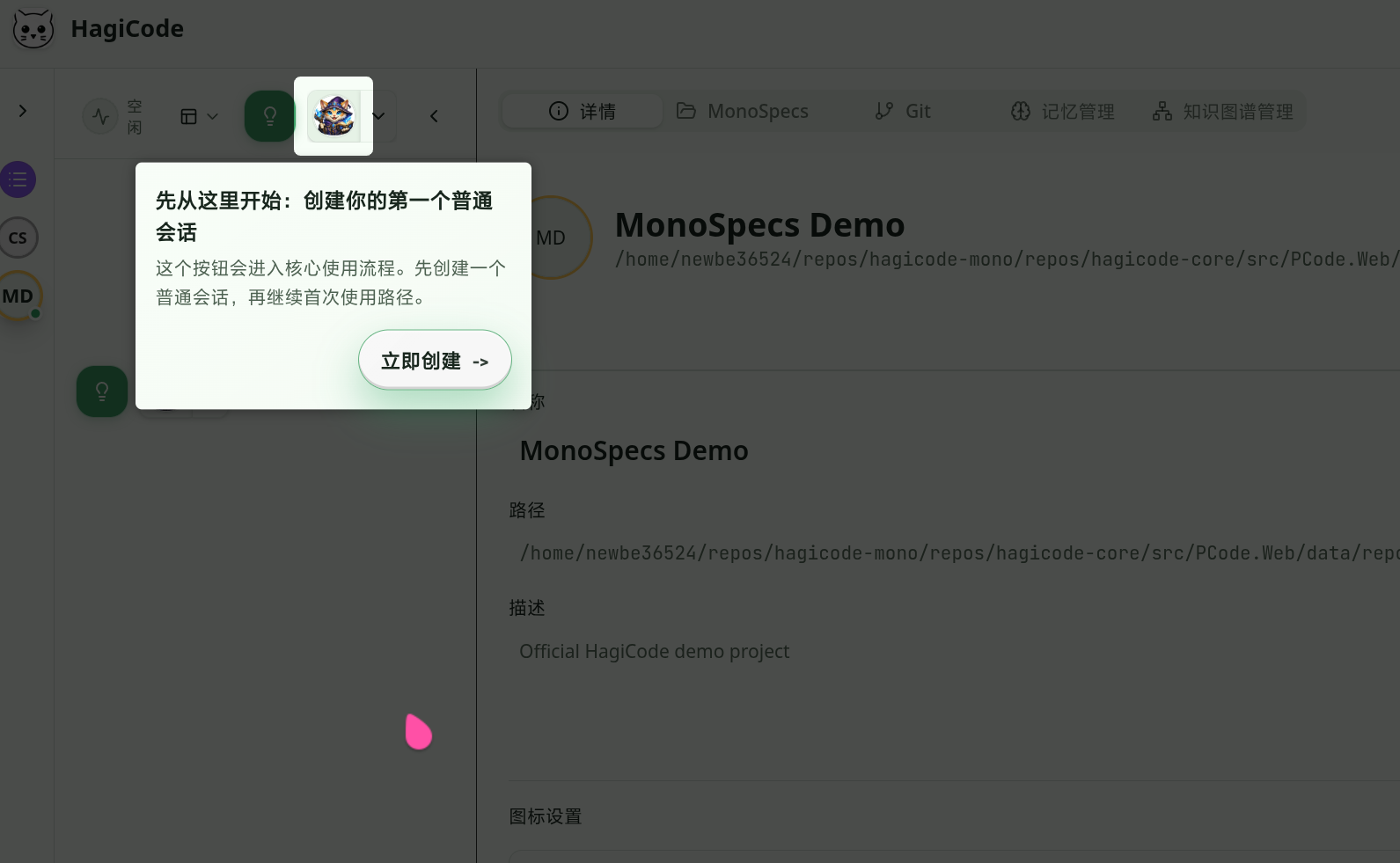
Session onboarding: starting from creating a conversation session

The first step of session onboarding takes the user to the entry point for creating a new Conversation session.

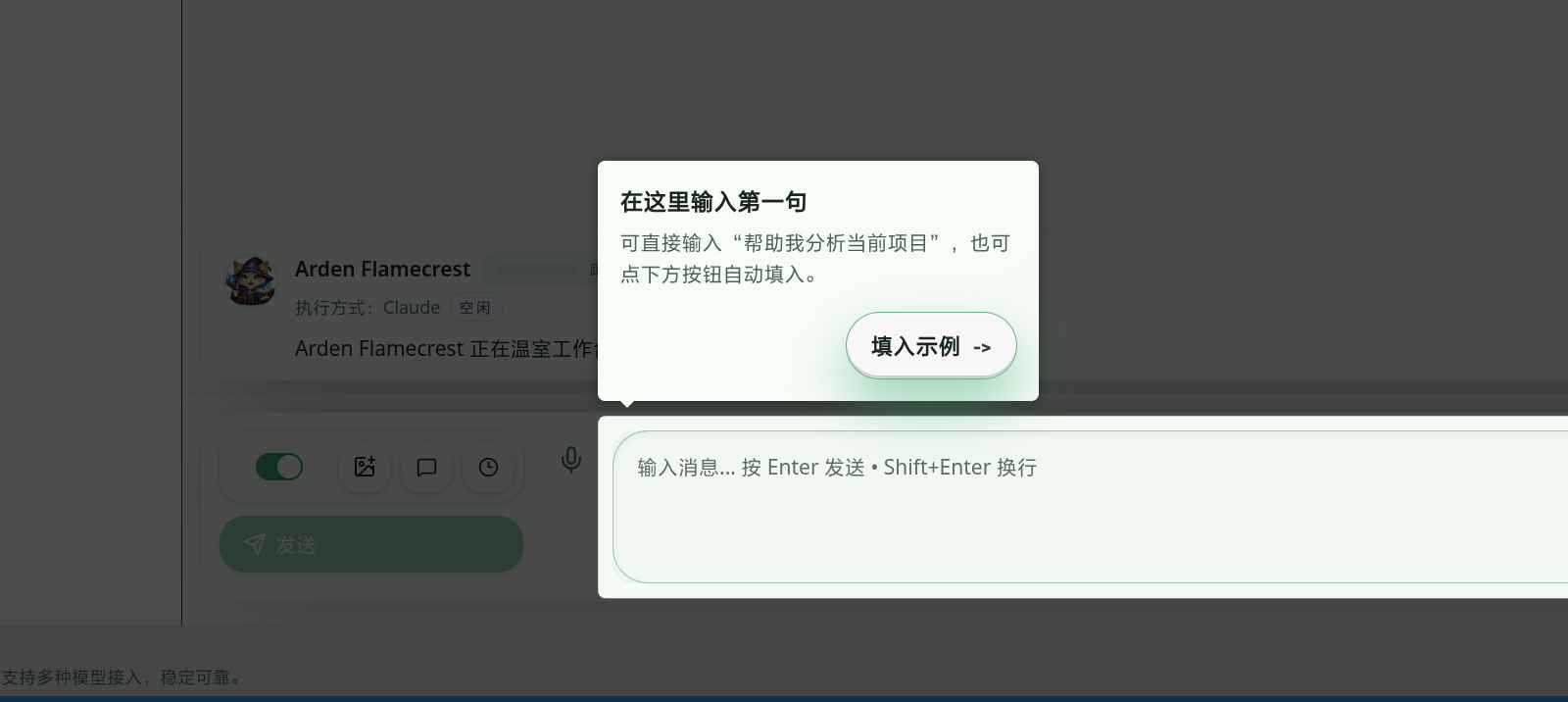
Session onboarding: entering the first request

Next, the guide prompts the user to type their first request into the input box, lowering the barrier to getting started.

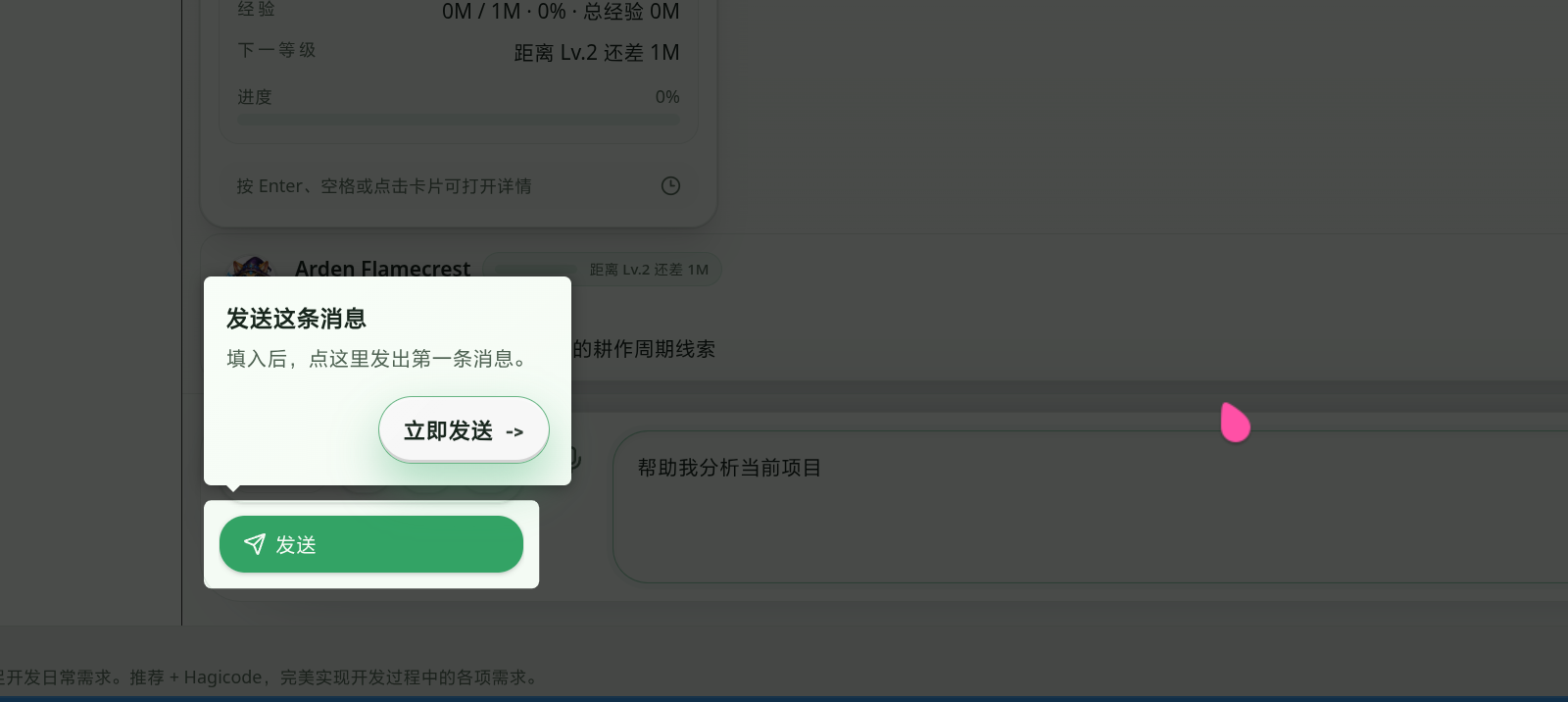
Session onboarding: sending the first message

After the input is complete, the guide clearly prompts the user to send the first message so the action flow feels more connected.

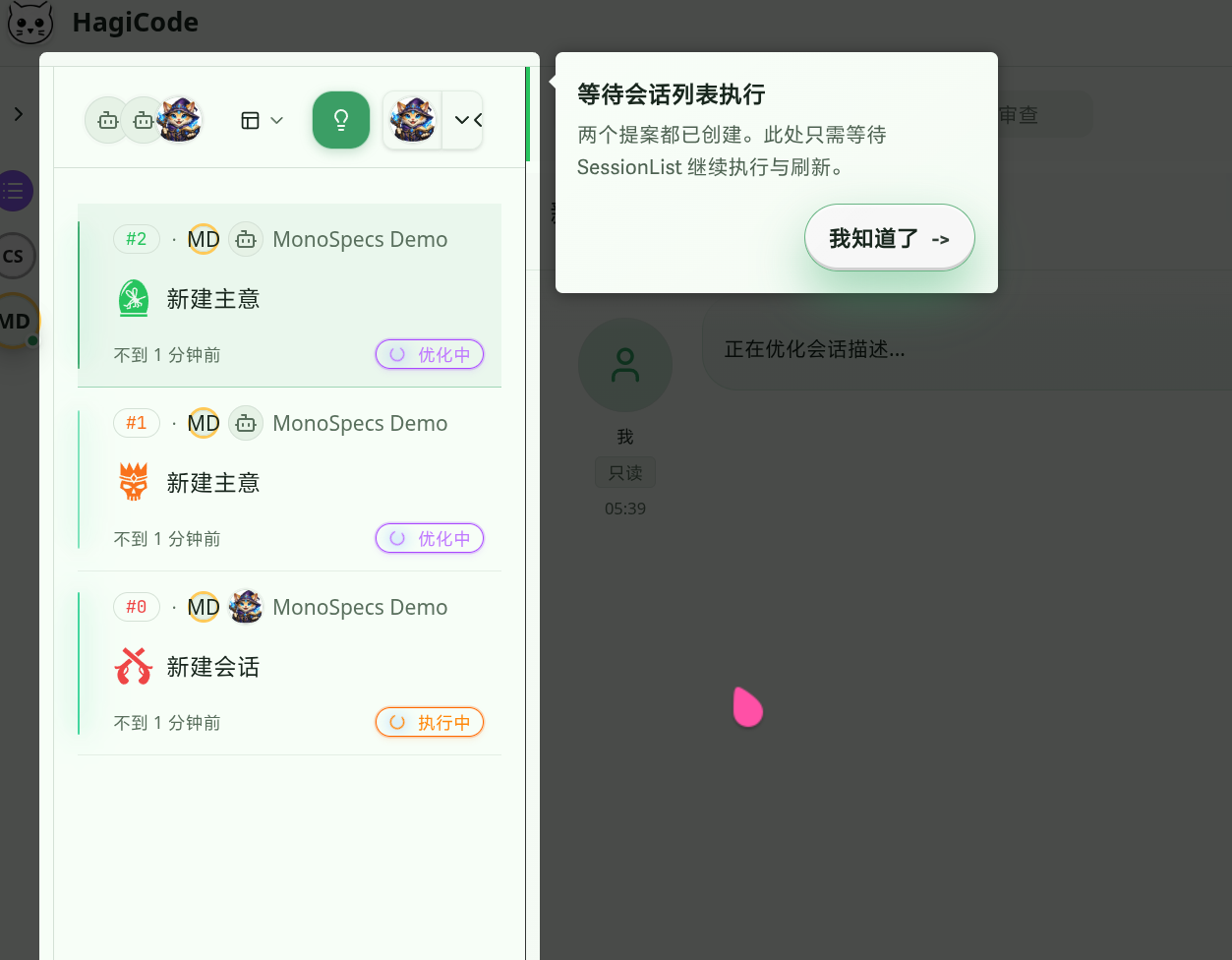
Session onboarding: waiting in the session list for continued execution

Once both Proposals have been created, the guide returns to the session list and lets the user know that the next step is simply to wait for the system to continue execution and refresh.

When users enter the Proposal detail page, HagiCode triggers the corresponding guide based on the Proposal’s current state:

  1. drafting (draft stage) - Guide the user to review the AI-generated plan
  2. reviewing (review stage) - Guide the user to execute the plan
  3. executionCompleted (completed stage) - Guide the user to archive the plan

The defining characteristic of this guide is that it is state-driven: it dynamically decides which onboarding step to show based on the Proposal’s actual state. Things change, and onboarding should change with them.

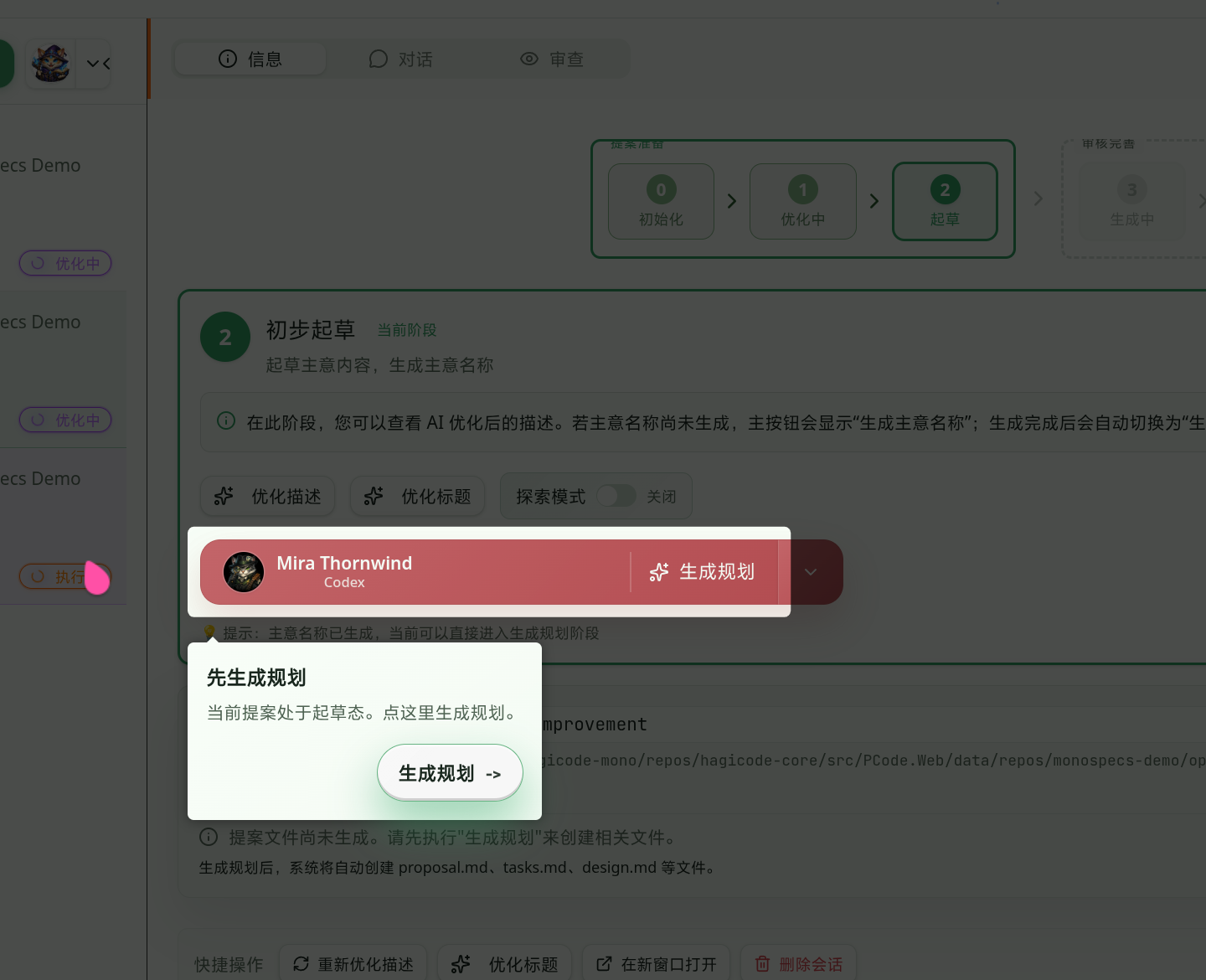
The screenshot below shows the Proposal detail page in its onboarding state during the drafting phase:

Proposal detail onboarding: generate the plan first during drafting

At this stage, the guide focuses the user’s attention on the key action of generating a plan, so they do not wonder what to do first when entering the detail page for the first time.

In React applications, the target onboarding element may not have finished rendering yet, for example because asynchronous data is still loading. To handle this, HagiCode implements a retry mechanism:

const waitForElement = (selector: string, maxRetries = 10, interval = 100) => {
let retries = 0;
return new Promise<HTMLElement>((resolve, reject) => {
const checkElement = () => {
const element = document.querySelector(selector) as HTMLElement;
if (element) {
resolve(element);
} else if (retries < maxRetries) {
retries++;
setTimeout(checkElement, interval);
} else {
reject(new Error(`Element not found: ${selector}`));
}
};
checkElement();
});
};

Call this function before initializing the guide to make sure the target element already exists. Sometimes waiting a little longer is worth it.

Based on HagiCode’s practical experience, here are a few key best practices:

Do not force users to complete onboarding. Some users are explorers by nature and prefer to figure things out on their own. Provide a clear “Skip” button, remember their choice, and do not interrupt them again next time.

2. Keep Onboarding Content Short and Sharp

Section titled “2. Keep Onboarding Content Short and Sharp”

Each onboarding step should focus on a single goal:

  • Title: Short and clear, ideally no more than a few words
  • Description: Get straight to the point and tell the user what this is and why it matters

Avoid long-winded explanations. User attention is limited during onboarding, and the more you say, the less likely they are to read it.

Use stable element markers that do not change often. The custom data-guide attribute is a good choice. Avoid depending on class names or DOM structure, because those are easy to change during refactors. Code changes all the time, but some anchors should stay stable when possible.

HagiCode includes complete test cases for the onboarding feature:

describe('NewUserConversationGuide', () => {
it('should initialize guide state correctly', () => {
const state = getUserGuideState();
expect(state.session).toBe('pending');
});
it('should update guide state correctly', () => {
setUserGuideState({ session: 'completed', detailGuides: {} });
const state = getUserGuideState();
expect(state.session).toBe('completed');
});
});

Tests help ensure that refactoring does not accidentally break onboarding behavior. Nobody wants a small code change to quietly damage previously working functionality.

  • Use dynamic imports to lazy-load the onboarding library
  • Avoid initializing onboarding logic after the user has already completed the guide
  • Consider the performance impact of animations, and disable them on lower-end devices if needed

Performance, like many things in life, deserves a bit of careful budgeting.

New user onboarding is an important part of improving product user experience. In the HagiCode project, we used driver.js to build a complete onboarding system that covers the full workflow from session creation to Proposal execution.

The core points we hope to share through this article are:

  1. Technical choices should match actual needs: driver.js is not the most powerful option, but it is the best fit for us
  2. State management is critical: Use localStorage to persist onboarding state and avoid repeatedly interrupting users
  3. Onboarding design should stay focused: Each step should solve one problem, and no more
  4. Code structure should stay clear: Separate onboarding configuration, state management, and UI logic to make maintenance easier

If you are adding new user onboarding to your own project, I hope the practical experience in this article helps. There is nothing especially mystical about this kind of technology. Keep trying, keep summarizing what you learn, and things gradually get easier.

Thank you for reading. If you found this article useful, feel free to like, bookmark, and share it. This content was created with AI-assisted collaboration, and the final content was reviewed and confirmed by the author.

How Gamification Design Makes AI Coding More Fun

How Gamification Design Makes AI Coding More Fun

Section titled “How Gamification Design Makes AI Coding More Fun”

Traditional AI coding tools are actually quite powerful; they just lack a bit of warmth. When we were building HagiCode, we thought: if we are going to write code anyway, why not turn it into a game?

Anyone who has used an AI coding assistant has probably had this experience: at first it feels fresh and exciting, but after a while it starts to feel like something is missing. The tool itself is powerful, capable of code generation, autocomplete, and Bug fixes, but… it does not feel very warm, and over time it can become monotonous and dull.

That alone is enough to make you wonder who wants to stare at a cold, impersonal tool every day.

It is a bit like playing a game. If all you do is finish a task list, with no character growth, no achievement unlocks, and no team coordination, it quickly stops being fun. Beautiful things and people do not need to be possessed to be appreciated; their beauty is enough on its own. Programming tools do not even offer that kind of beauty, so it is easy to lose heart.

We ran into exactly this problem while developing HagiCode. As a multi-AI assistant collaboration platform, HagiCode needs to keep users engaged over the long term. But in reality, even a great tool is hard to stick with if it lacks any emotional connection.

To solve this pain point, we made a bold decision: turn programming into a game. Not the superficial kind with a simple points leaderboard, but a true role-playing gamified experience. The impact of that decision may be even bigger than you imagine.

After all, people need a bit of ritual in their lives.

The ideas shared in this article come from our practical experience on the HagiCode project. HagiCode is a multi-AI assistant collaboration platform that supports Claude Code, Codex, Copilot, OpenCode, and other AI assistants working together. If you are interested in multi-AI collaboration or gamified programming, visit github.com/HagiCode-org/site to learn more.

There is nothing especially mysterious about it. We simply turned programming into an adventure.

The essence of gamification is not just “adding a leaderboard.” It is about building a complete incentive system so users can feel growth, achievement, and social recognition while doing tasks.

HagiCode’s gamification design revolves around one core idea: every AI assistant is a “Hero,” and the user is the captain of this Hero team. You lead these Heroes to conquer various “Dungeons” (programming tasks). Along the way, Heroes gain experience, level up, unlock abilities, and your team earns achievements as well.

This is not a gimmick. It is a design grounded in human behavioral psychology. When tasks are given meaning and progress feedback, people’s engagement and persistence increase significantly.

As the old saying goes, “This feeling can become a memory, though at the time it left us bewildered.” We bring that emotional experience into the tool, so programming is no longer just typing code, but a journey worth remembering.

Hero is the core concept in HagiCode’s gamification system. Each Hero represents one AI assistant. For example, Claude Code is a Hero, and Codex is also a Hero.

A Hero has three equipment slots, and the design is surprisingly elegant:

  1. CLI slot (main class): Determines the Hero’s base ability, such as whether it is Claude Code or Codex
  2. Model slot (secondary class): Determines which model is used, such as Claude 4.5 or Claude 4.6
  3. Style slot (style): Determines the Hero’s behavior style, such as “Fengluo Strategist” or another style

The combination of these three slots creates unique Hero configurations. Much like equipment builds in games, you choose the right setup based on the task. After all, what suits you best is what matters most. Life is similar: many roads lead to Rome, but some are smoother than others.

Each Hero has its own XP and level:

type HeroProgressionSnapshot = {
currentLevel: number; // Current level
totalExperience: number; // Total experience
currentLevelStartExperience: number; // Experience at the start of the current level
nextLevelExperience: number; // Experience required for the next level
experienceProgressPercent: number; // Progress percentage
remainingExperienceToNextLevel: number; // Experience still needed for the next level
lastExperienceGain: number; // Most recent experience gained
lastExperienceGainAtUtc?: string | null; // Time when experience was gained
};

Levels are divided into four stages, and each stage has an immersive name:

export const resolveHeroProgressionStage = (level?: number | null): HeroProgressionStage => {
const normalizedLevel = Math.max(1, level ?? 1);
if (normalizedLevel <= 100) return 'rookieSprint'; // Rookie sprint
if (normalizedLevel <= 300) return 'growthRun'; // Growth run
if (normalizedLevel <= 700) return 'veteranClimb'; // Veteran climb
return 'legendMarathon'; // Legend marathon
};

From “rookie” to “legend,” this growth path gives users a clear sense of direction and achievement. It mirrors personal growth in life, from confusion to maturity, only made more tangible here.

To create a Hero, you need to configure three slots:

const heroDraft: HeroDraft = {
name: 'Athena',
icon: 'hero-avatar:storm-03',
description: 'A brilliant strategist',
executorType: AIProviderType.CLAUDE_CODE_CLI,
slots: {
cli: {
id: 'profession-claude-code',
parameters: { /* CLI-related parameters */ }
},
model: {
id: 'secondary-claude-4-sonnet',
parameters: { /* Model-related parameters */ }
},
style: {
id: 'fengluo-strategist',
parameters: { /* Style-related parameters */ }
}
}
};

Every Hero has a unique avatar, description, and professional identity, which gives what would otherwise be a cold AI assistant more personality and warmth. After all, who wants to work with a tool that has no character?

A “Dungeon” is a classic game concept representing a challenge that requires a team to clear. In HagiCode, each workflow is a Dungeon.

Dungeon organizes workflows into different “Dungeons”:

  • Proposal generation dungeon: Responsible for generating technical proposals
  • Proposal execution dungeon: Responsible for executing tasks in proposals
  • Proposal archive dungeon: Responsible for organizing and archiving completed proposals

Each dungeon has its own Captain Hero, and the captain is automatically chosen as the first enabled Hero.

This is really just division of labor, like in everyday life, except turned into a game mechanic.

You can configure different Hero squads for different dungeons:

const dungeonRoster: HeroDungeonRoster = {
scriptKey: 'proposal.generate',
displayName: 'Proposal Generation',
members: [
{ heroId: 'hero-1', name: 'Athena', executorType: 'ClaudeCode' },
{ heroId: 'hero-2', name: 'Apollo', executorType: 'Codex' }
]
};

For example, you can use Athena for generating proposals because it is good at strategy, and Apollo for implementing code because it is good at execution. That way, every Hero can play to its strengths. It is like forming a band: each person has an instrument, and together they create something beautiful.

Dungeon uses fixed scriptKey values to identify different workflows:

// Script keys map to different workflows
const dungeonScripts = {
'proposal.generate': 'Proposal Generation',
'proposal.execute': 'Proposal Execution',
'proposal.archive': 'Proposal Archive'
};

The task state flow is: queued (waiting) -> dispatching (being assigned) -> dispatched (assigned). The whole process is automated and requires no manual intervention. That is also part of our lazy side, because who wants to manage this stuff by hand?

XP is the core feedback mechanism in the gamification system. Users gain XP by completing tasks, XP levels up Heroes, and leveling up unlocks new abilities, forming a positive feedback loop.

In HagiCode, XP can be earned through the following activities:

  • Completing code execution
  • Successfully calling tools
  • Generating proposals
  • Session management operations
  • Project operations

Every time a valid action is completed, the corresponding Hero gains XP. Just like growth in life, every step counts, only here that growth is quantified.

XP and level progress are visualized in real time:

type HeroDungeonMember = {
heroId: string;
name: string;
icon?: string | null;
executorType: PCode_Models_AIProviderType;
currentLevel?: number; // Current level
totalExperience?: number; // Total experience
experienceProgressPercent?: number; // Progress percentage
};

Users can always see each Hero’s level and progress, and that immediate feedback is the key to gamification design. People need feedback, otherwise how would they know they are improving?

Achievements are another important element in gamification. They provide long-term goals and milestone-driven satisfaction.

HagiCode supports multiple types of achievements:

  • Code generation achievements: Generate X lines of code, generate Y files
  • Session management achievements: Complete Z conversations
  • Project operation achievements: Work across W projects

These achievements are really like milestones in life, except we have turned them into a game mechanic.

Achievements have three states:

type AchievementStatus = 'unlocked' | 'in-progress' | 'locked';

The three states have clear visual distinctions:

  • Unlocked: Gold gradient with a halo effect
  • In progress: Blue pulse animation
  • Locked: Gray, with unlock conditions shown

Each achievement clearly displays its trigger condition, so users know what to do next. When people feel lost, a little guidance always helps.

When an achievement is unlocked, a celebration animation is triggered. That kind of positive reinforcement gives users the satisfying feeling of “I did it” and motivates them to keep going. Small rewards in life work the same way: they may be small, but the happiness can last a long time.

Battle Report is one of HagiCode’s signature features. At the end of each day, it generates a full-screen battle-style report.

Battle Report displays the following information:

type HeroBattleReport = {
reportDate: string;
summary: {
totalHeroCount: number; // Total number of Heroes
activeHeroCount: number; // Number of active Heroes
totalBattleScore: number; // Total battle score
mvp: HeroBattleHero; // Most valuable Hero
};
heroes: HeroBattleHero[]; // Detailed data for all Heroes
};
  • Total team score
  • Number of active Heroes
  • Number of tool calls
  • Total working time
  • MVP (Most Valuable Hero)
  • Detailed card for each Hero

The MVP is the best-performing Hero of the day and is highlighted in the report. This is not just data statistics, but a form of honor and recognition. After all, who does not want to be recognized?

Each Hero card includes:

  • Level progress
  • XP gained
  • Number of executions
  • Usage time

These metrics help users clearly understand how the team is performing. Seeing the results of your own effort is satisfying in itself.

HagiCode’s gamification system uses a modern technology stack and design patterns. There is nothing especially magical about it; we just chose tools that fit the job.

// React + TypeScript for the frontend
import React from 'react';
// Framer Motion for animations
import { AnimatePresence, motion } from 'framer-motion';
// Redux Toolkit for state management
import { useAppDispatch, useAppSelector } from '@/store';
// shadcn/ui for UI components
import { Dialog, DialogContent } from '@/components/ui/dialog';

Framer Motion handles all animation effects, shadcn/ui provides the foundational UI components, and Redux Toolkit manages the complex gamification state. Good tools make good work.

HagiCode uses a Glassmorphism + Tech Dark design style:

/* Primary gradient */
background: linear-gradient(135deg, #22C55E 0%, #25c2a0 50%, #06b6d4 100%);
/* Glass effect */
backdrop-filter: blur(12px);
/* Glow effect */
background: radial-gradient(circle at center, rgba(34, 197, 94, 0.15) 0%, transparent 70%);

The green gradient combined with glassmorphism creates a technical, futuristic atmosphere. Visual beauty is part of the user experience too.

Framer Motion is used to create smooth entrance animations:

<motion.div
animate={{ opacity: 1, y: 0 }}
initial={{ opacity: 0, y: 18 }}
transition={{ duration: 0.35, ease: 'easeOut', delay: index * 0.08 }}
className="card"
>
{/* Card content */}
</motion.div>

Each card enters one after another with a delay of 0.08 seconds, creating a fluid visual effect. Smooth animation improves the experience. That part is hard to argue with.

Gamification data is stored using the Grain storage system to ensure state consistency. Even fine-grained data like accumulated Hero XP can be persisted accurately. No one wants to lose the experience they worked hard to earn.

Creating your first Hero is actually quite simple:

  1. Go to the Hero management page
  2. Click the “Create Hero” button
  3. Configure the three slots (CLI, Model, Style)
  4. Give the Hero a name and description
  5. Save it, and your first Hero is born

It is like meeting a new friend: you give them a name, learn what makes them special, and then head off on an adventure together.

Building a team is also simple:

  1. Go to the Dungeon management page
  2. Choose the dungeon you want to configure, such as “Proposal Generation”
  3. Select members from your Hero list
  4. The system automatically selects the first enabled Hero as Captain
  5. Save the configuration

This is simply the process of forming a team, much like building a team in real life where everyone has their own role.

At the end of each day, you can view the day’s Battle Report:

  1. Click the “Battle Report” button
  2. View the day’s work results in a full-screen display
  3. Check the MVP and the detailed data for each Hero
  4. Share it with team members if you want

This is also a kind of ritual, a way to see how much effort you put in today and how far you still are from your goal.

Use React.memo to avoid unnecessary re-renders:

const HeroCard = React.memo(({ hero }: { hero: HeroDungeonMember }) => {
// Component implementation
});

Performance matters too. No one wants to use a laggy tool.

Detect the user’s motion preference settings and provide a simplified experience for motion-sensitive users:

const prefersReducedMotion = useReducedMotion();
const duration = prefersReducedMotion ? 0 : 0.35;

Not everyone likes animation, and respecting user preferences is part of good design.

Keep legacyIds to support migration from older versions:

type HeroDungeonMember = {
heroId: string;
legacyIds?: string[]; // Supports legacy ID mapping
// ...
};

No one wants to lose data just because of a version upgrade.

Use i18n translation keys for all text to make multi-language support easy:

const displayName = t(`dungeon.${scriptKey}`, { defaultValue: displayName });

Language should never be a barrier to using the product.

Gamification is not just a simple points leaderboard, but a complete incentive system. Through the Hero system, Dungeon system, XP and level system, achievement system, and Battle Report, HagiCode transforms programming work into a heroic journey full of adventure.

The core value of this system lies in:

  • Emotional connection: Giving cold AI assistants personality
  • Positive feedback: Every action produces immediate feedback
  • Long-term goals: Levels and achievements provide a growth path
  • Team identity: A sense of collaboration within Dungeon teams
  • Honor and recognition: Battle Report and MVP showcases

Gamification design makes programming no longer dull, but an interesting adventure. While completing coding tasks, users also experience the fun of character growth, team collaboration, and achievement unlocking, which improves retention and activity.

At its core, programming is already an act of creation. We just made the creative process a little more fun.

If this article helped you:


Thank you for reading. If you found this article useful, please click the like button below so more people can discover it.

This content was created with AI-assisted collaboration, reviewed by me, and reflects my own views and position.